# dify-java-client
**Repository Path**: zhangriguang/dify-java-client
## Basic Information
- **Project Name**: dify-java-client
- **Description**: Dify 是一个用于构建 AI 工作流的开源平台,而Dify Java Client 是一个用于与 Dify 平台进行交互的 Java 客户端库。它提供了对 Dify 应用 API 和知识库 API 的完整支持,让 Java 开发者能够轻松地将 Dify 的生成式 AI 能力集成到自己的应用中。已扩展支持到最新Dify1.15.0的接口!
- **Primary Language**: Java
- **License**: Apache-2.0
- **Default Branch**: main
- **Homepage**: None
- **GVP Project**: No
## Statistics
- **Stars**: 143
- **Forks**: 56
- **Created**: 2025-05-09
- **Last Updated**: 2026-07-14
## Categories & Tags
**Categories**: ai
**Tags**: None
## README
# Dify Java Client
[](https://search.maven.org/search?q=g:io.github.imfangs%20AND%20a:dify-java-client)
[](https://github.com/imfangs/dify-java-client/blob/main/LICENSE)
[](https://www.java.com)
[English](README_EN.md) | 简体中文 | [日本語](README_JP.md)
Dify Java Client 是一个用于与 [Dify](https://dify.ai) 平台进行交互的 Java 客户端库。它提供了对 Dify 应用 API 和知识库 API 的完整支持,让 Java 开发者能够轻松地将 Dify 的生成式 AI 能力集成到自己的应用中。
## 功能特性
Dify Java Client 提供以下核心功能:
### 1. 多种应用类型支持
- **对话型应用 (Chat)**: 通过 `DifyChatClient` 调用对话型应用,支持会话管理、消息反馈等功能
- **文本生成应用 (Completion)**: 通过 `DifyCompletionClient` 调用文本生成型应用
- **工作流编排对话 (Chatflow)**: 通过 `DifyChatflowClient` 调用工作流编排对话型应用
- **工作流应用 (Workflow)**: 通过 `DifyWorkflowClient` 调用工作流应用
- **知识库管理 (Datasets)**: 通过 `DifyDatasetsClient` 管理知识库、文档和检索
### 2. 丰富的交互模式
- **阻塞模式**: 同步调用API,等待完整响应
- **流式模式**: 通过回调接收实时生成的内容,支持打字机效果
- **文件处理**: 支持文件上传、语音转文字、文字转语音等多媒体功能
### 3. 完整的会话管理
- 创建和管理会话
- 获取历史消息
- 会话重命名
- 消息反馈(点赞/点踩)
- 获取建议问题
### 4. 知识库全流程支持
- 创建和管理知识库
- 上传和管理文档
- 文档分段管理
- 语义检索
### 5. 灵活的配置选项
- 自定义连接超时
- 自定义读写超时
- 自定义HTTP客户端
## 安装
### 系统要求
- Java 8 或更高版本
- Maven 3.x 或 Gradle 4.x 以上
### Maven
```xml
io.github.imfangs
dify-java-client
1.6.0
```
### Gradle
```groovy
implementation 'io.github.imfangs:dify-java-client:1.6.0'
```
## 快速开始
### 创建客户端
```java
// 创建完整的 Dify 客户端
DifyClient client = DifyClientFactory.createClient("https://api.dify.ai/v1", "your-api-key");
// 创建特定类型的客户端
DifyChatClient chatClient = DifyClientFactory.createChatClient("https://api.dify.ai/v1", "your-api-key");
DifyCompletionClient completionClient = DifyClientFactory.createCompletionClient("https://api.dify.ai/v1", "your-api-key");
DifyChatflowClient chatflowClient = DifyClientFactory.createChatWorkflowClient("https://api.dify.ai/v1", "your-api-key");
DifyWorkflowClient workflowClient = DifyClientFactory.createWorkflowClient("https://api.dify.ai/v1", "your-api-key");
DifyDatasetsClient datasetsClient = DifyClientFactory.createDatasetsClient("https://api.dify.ai/v1", "your-api-key");
// 使用自定义配置创建客户端
DifyConfig config = DifyConfig.builder()
.baseUrl("https://api.dify.ai/v1")
.apiKey("your-api-key")
.connectTimeout(5000)
.readTimeout(60000)
.writeTimeout(30000)
.build();
DifyClient clientWithConfig = DifyClientFactory.createClient(config);
```
## 使用示例
### 1. 对话型应用 (Chat)
#### 阻塞模式
```java
// 创建聊天客户端
DifyChatClient chatClient = DifyClientFactory.createChatClient("https://api.dify.ai/v1", "your-api-key");
// 创建聊天消息
ChatMessage message = ChatMessage.builder()
.query("你好,请介绍一下自己")
.user("user-123")
.responseMode(ResponseMode.BLOCKING)
.build();
// 发送消息并获取响应
ChatMessageResponse response = chatClient.sendChatMessage(message);
System.out.println("回复: " + response.getAnswer());
System.out.println("会话ID: " + response.getConversationId());
System.out.println("消息ID: " + response.getMessageId());
```
#### 流式模式
```java
// 创建聊天消息
ChatMessage message = ChatMessage.builder()
.query("请给我讲一个简短的故事")
.user("user-123")
.responseMode(ResponseMode.STREAMING)
.build();
// 发送流式消息
chatClient.sendChatMessageStream(message, new ChatStreamCallback() {
@Override
public void onMessage(MessageEvent event) {
System.out.println("收到消息片段: " + event.getAnswer());
}
@Override
public void onMessageEnd(MessageEndEvent event) {
System.out.println("消息结束,完整消息ID: " + event.getMessageId());
}
@Override
public void onError(ErrorEvent event) {
System.err.println("错误: " + event.getMessage());
}
@Override
public void onException(Throwable throwable) {
System.err.println("异常: " + throwable.getMessage());
}
});
```
#### 会话管理
```java
// 获取会话历史消息
MessageListResponse messages = chatClient.getMessages(conversationId, "user-123", null, 10);
// 获取会话列表
ConversationListResponse conversations = chatClient.getConversations("user-123", null, 10, "-updated_at");
// 重命名会话
Conversation renamedConversation = chatClient.renameConversation(conversationId, "新会话名称", false, "user-123");
// 删除会话
SimpleResponse deleteResponse = chatClient.deleteConversation(conversationId, "user-123");
```
#### 消息反馈
```java
// 发送消息反馈(点赞)
SimpleResponse feedbackResponse = chatClient.feedbackMessage(messageId, "like", "user-123", "这是一个很好的回答");
// 获取建议问题
SuggestedQuestionsResponse suggestedQuestions = chatClient.getSuggestedQuestions(messageId, "user-123");
```
#### 语音转换
```java
// 语音转文字
AudioToTextResponse textResponse = chatClient.audioToText(audioFile, "user-123");
System.out.println("转换后的文本: " + textResponse.getText());
// 文字转语音
byte[] audioData = chatClient.textToAudio(null, "这是一段测试文本", "user-123");
```
### 2. 文本生成应用 (Completion)
#### 阻塞模式
```java
// 创建文本生成客户端
DifyCompletionClient completionClient = DifyClientFactory.createCompletionClient("https://api.dify.ai/v1", "your-api-key");
// 创建请求
Map inputs = new HashMap<>();
inputs.put("content", "茄子");
CompletionRequest request = CompletionRequest.builder()
.inputs(inputs)
.responseMode(ResponseMode.BLOCKING)
.user("user-123")
.build();
// 发送请求并获取响应
CompletionResponse response = completionClient.sendCompletionMessage(request);
System.out.println("生成的文本: " + response.getAnswer());
```
#### 流式模式
```java
// 创建请求
Map inputs = new HashMap<>();
inputs.put("content", "茄子");
CompletionRequest request = CompletionRequest.builder()
.inputs(inputs)
.responseMode(ResponseMode.STREAMING)
.user("user-123")
.build();
// 发送流式请求
completionClient.sendCompletionMessageStream(request, new CompletionStreamCallback() {
@Override
public void onMessage(MessageEvent event) {
System.out.println("收到消息片段: " + event.getAnswer());
}
@Override
public void onMessageEnd(MessageEndEvent event) {
System.out.println("消息结束,完整消息ID: " + event.getMessageId());
}
@Override
public void onError(ErrorEvent event) {
System.err.println("错误: " + event.getMessage());
}
@Override
public void onException(Throwable throwable) {
System.err.println("异常: " + throwable.getMessage());
}
});
```
#### 停止生成
```java
// 停止文本生成
SimpleResponse stopResponse = completionClient.stopCompletion(taskId, "user-123");
```
### 3. 工作流应用 (Workflow)
#### 阻塞模式
```java
// 创建工作流客户端
DifyWorkflowClient workflowClient = DifyClientFactory.createWorkflowClient("https://api.dify.ai/v1", "your-api-key");
// 创建工作流请求
Map inputs = new HashMap<>();
inputs.put("content", "请介绍一下人工智能的应用场景");
WorkflowRunRequest request = WorkflowRunRequest.builder()
.inputs(inputs)
.responseMode(ResponseMode.BLOCKING)
.user("user-123")
.build();
// 执行工作流并获取响应
WorkflowRunResponse response = workflowClient.runWorkflow(request);
System.out.println("工作流执行ID: " + response.getTaskId());
// 输出结果
if (response.getData() != null) {
for (Map.Entry entry : response.getData().getOutputs().entrySet()) {
System.out.println(entry.getKey() + ": " + entry.getValue());
}
}
```
#### 流式模式
```java
// 创建工作流请求
Map inputs = new HashMap<>();
inputs.put("content", "请详细介绍一下机器学习的基本原理");
WorkflowRunRequest request = WorkflowRunRequest.builder()
.inputs(inputs)
.responseMode(ResponseMode.STREAMING)
.user("user-123")
.build();
// 执行工作流流式请求
workflowClient.runWorkflowStream(request, new WorkflowStreamCallback() {
@Override
public void onWorkflowStarted(WorkflowStartedEvent event) {
System.out.println("工作流开始: " + event);
}
@Override
public void onNodeStarted(NodeStartedEvent event) {
System.out.println("节点开始: " + event);
}
@Override
public void onNodeFinished(NodeFinishedEvent event) {
System.out.println("节点完成: " + event);
}
@Override
public void onWorkflowFinished(WorkflowFinishedEvent event) {
System.out.println("工作流完成: " + event);
}
@Override
public void onError(ErrorEvent event) {
System.err.println("错误: " + event.getMessage());
}
@Override
public void onException(Throwable throwable) {
System.err.println("异常: " + throwable.getMessage());
}
});
```
#### 工作流管理
```java
// 停止工作流
WorkflowStopResponse stopResponse = workflowClient.stopWorkflow(taskId, "user-123");
// 获取工作流执行情况
WorkflowRunStatusResponse statusResponse = workflowClient.getWorkflowRun(workflowRunId);
// 获取工作流日志
WorkflowLogsResponse logsResponse = workflowClient.getWorkflowLogs(null, null, 1, 10);
```
### 4. 知识库管理 (Datasets)
#### 创建和管理知识库
```java
// 创建知识库客户端
DifyDatasetsClient datasetsClient = DifyClientFactory.createDatasetsClient("https://api.dify.ai/v1", "your-api-key");
// 创建知识库
CreateDatasetRequest createRequest = CreateDatasetRequest.builder()
.name("测试知识库-" + System.currentTimeMillis())
.description("这是一个测试知识库")
.indexingTechnique("high_quality")
.permission("only_me")
.provider("vendor")
.build();
DatasetResponse dataset = datasetsClient.createDataset(createRequest);
System.out.println("创建的知识库ID: " + dataset.getId());
// 获取知识库列表
DatasetListResponse datasetList = datasetsClient.getDatasets(1, 10);
System.out.println("知识库总数: " + datasetList.getTotal());
```
#### 文档管理
```java
// 通过文本创建文档 - 使用自动处理模式(推荐)
CreateDocumentByTextRequest docRequest = CreateDocumentByTextRequest.builder()
.name("测试文档-" + System.currentTimeMillis())
.text("这是一个测试文档的内容。\n这是第二行内容。\n这是第三行内容。")
.indexingTechnique("high_quality")
.docForm("text_model")
.docLanguage("Chinese")
.processRule(ProcessRule.builder()
.mode("automatic") // 使用自动处理模式
.build())
.build();
DocumentResponse docResponse = datasetsClient.createDocumentByText(datasetId, docRequest);
System.out.println("创建的文档ID: " + docResponse.getDocument().getId());
// 获取文档列表
DocumentListResponse docList = datasetsClient.getDocuments(datasetId, null, 1, 10);
System.out.println("文档总数: " + docList.getTotal());
// 删除文档
SimpleResponse deleteResponse = datasetsClient.deleteDocument(datasetId, documentId);
```
#### 知识库检索
```java
// 创建检索请求
RetrievalModel retrievalModel = new RetrievalModel();
retrievalModel.setTopK(3);
retrievalModel.setScoreThreshold(0.5f);
RetrieveRequest retrieveRequest = RetrieveRequest.builder()
.query("什么是人工智能")
.retrievalModel(retrievalModel)
.build();
// 发送检索请求
RetrieveResponse retrieveResponse = datasetsClient.retrieveDataset(datasetId, retrieveRequest);
// 处理检索结果
System.out.println("检索查询: " + retrieveResponse.getQuery().getContent());
System.out.println("检索结果数量: " + retrieveResponse.getRecords().size());
retrieveResponse.getRecords().forEach(record -> {
System.out.println("分数: " + record.getScore());
System.out.println("内容: " + record.getSegment().getContent());
});
```
#### 文档下载
```java
// 单文档:获取签名下载 URL(限时有效)
DocumentDownloadUrlResponse url = datasetsClient.getDocumentDownloadUrl(datasetId, documentId);
System.out.println("下载 URL: " + url.getUrl());
// 批量:一次最多 100 个文档打包为 ZIP
DocumentBatchDownloadRequest batchRequest = DocumentBatchDownloadRequest.builder()
.documentIds(java.util.Arrays.asList(documentId1, documentId2))
.build();
try (FilePreviewResponse zip = datasetsClient.downloadDocumentsAsZip(datasetId, batchRequest)) {
byte[] bytes = zip.getContentAsBytes();
java.nio.file.Files.write(java.nio.file.Paths.get(zip.getFileName()), bytes);
}
```
#### 知识库 Pipeline(RAG Pipeline)
```java
// 1) 列出 Pipeline 中已配置的数据源节点
List nodes = datasetsClient.listPipelineDatasourcePlugins(datasetId, true);
String startNodeId = nodes.get(0).getNodeId();
// 2) 为 Pipeline 上传文件(本地文件类型的数据源)
PipelineFileUploadResponse uploaded = datasetsClient.uploadPipelineFile(new java.io.File("./doc.pdf"));
// 3) 运行整个 Pipeline(阻塞模式)
java.util.Map localFileItem = new java.util.HashMap<>();
localFileItem.put("reference", uploaded.getId());
localFileItem.put("name", uploaded.getName());
PipelineRunRequest runRequest = PipelineRunRequest.builder()
.inputs(new java.util.HashMap<>())
.datasourceType("local_file")
.datasourceInfoList(java.util.Arrays.asList(localFileItem))
.startNodeId(startNodeId)
.isPublished(true)
.build();
java.util.Map result = datasetsClient.runPipeline(datasetId, runRequest);
// 或流式模式
datasetsClient.runPipelineStream(datasetId, runRequest, new WorkflowStreamCallback() {
@Override
public void onNodeFinished(NodeFinishedEvent event) {
System.out.println("节点完成: " + event.getData().getTitle());
}
});
// 4) 单独运行某个数据源节点(流式)
DatasourceNodeRunRequest nodeRequest = DatasourceNodeRunRequest.builder()
.inputs(new java.util.HashMap<>())
.datasourceType("local_file")
.isPublished(true)
.build();
datasetsClient.runPipelineDatasourceNodeStream(datasetId, startNodeId, nodeRequest, callback);
```
### 5. 终端用户 (End Users)
```java
// 根据 ID 查询终端用户详情
// 常见场景:其他接口(如文件上传)返回 created_by 是 end-user ID 时,可回查详细信息
EndUserResponse endUser = client.getEndUser(endUserId);
System.out.println("external_user_id: " + endUser.getExternalUserId());
System.out.println("session_id: " + endUser.getSessionId());
```
### 6. 人工介入 (Human Input Flow)
Dify 1.14.2+ 支持在 Workflow/Chatflow 中插入 Human Input 节点让人工填写表单后继续执行。SDK 支持完整闭环。
```java
// 1) 订阅工作流 - 遇到人工介入节点时会触发 onHumanInputRequired
workflowClient.runWorkflowStream(request, new WorkflowStreamCallback() {
@Override
public void onHumanInputRequired(HumanInputRequiredEvent event) {
String formToken = event.getData().getFormToken();
String workflowRunId = event.getWorkflowRunId();
// 缓存 formToken 和 workflowRunId,进入人工审批流程
handoffToReviewer(formToken, workflowRunId);
}
@Override
public void onWorkflowPaused(WorkflowPausedEvent event) {
System.out.println("工作流已暂停,等待人工介入");
}
});
// 2) 获取表单内容(可以在另一个进程/服务中)
HumanInputFormResponse form = client.getHumanInputForm(formToken);
System.out.println("表单内容: " + form.getFormContent());
System.out.println("可选操作: " + form.getUserActions());
// 3) 用户填写并提交表单
java.util.Map inputs = new java.util.HashMap<>();
inputs.put("decision", "approve");
inputs.put("comment", "看起来没问题");
HumanInputFormSubmitRequest submit = HumanInputFormSubmitRequest.builder()
.inputs(inputs)
.action("action-approve") // 匹配 form.getUserActions() 中某一项的 id
.user("reviewer-alice")
.build();
client.submitHumanInputForm(formToken, submit);
// 4) 恢复订阅工作流事件流(提交后工作流从暂停处继续)
workflowClient.streamWorkflowEvents(workflowRunId, "reviewer-alice", true, false,
new WorkflowStreamCallback() {
@Override
public void onWorkflowFinished(WorkflowFinishedEvent event) {
System.out.println("工作流完成: " + event.getData().getStatus());
}
});
```
### 7. 思考流 (reasoning_chunk)
当 Chatflow 应用中的 LLM 节点开启 `reasoning_format=separated` 时,模型的思考内容会通过 `reasoning_chunk` 事件与正文并行流出。
```java
chatflowClient.sendChatMessageStream(message, new ChatflowStreamCallback() {
@Override
public void onReasoningChunk(ReasoningChunkEvent event) {
// 在 UI 上单独渲染"思考中"面板
String reasoning = event.getData().getReasoning();
boolean isFinal = Boolean.TRUE.equals(event.getData().getIsFinal());
renderThinking(reasoning, isFinal);
}
@Override
public void onMessage(MessageEvent event) {
// 正文答复
appendAnswer(event.getAnswer());
}
});
```
## API 参考
### 客户端类型
| 客户端类型 | 描述 | 主要功能 |
|------------|------|----------|
| `DifyClient` | 完整客户端 | 支持所有API功能 |
| `DifyChatClient` | 对话型应用客户端 | 对话、会话管理、消息反馈 |
| `DifyCompletionClient` | 文本生成型应用客户端 | 文本生成、停止生成 |
| `DifyChatflowClient` | 工作流编排对话型应用客户端 | 工作流编排对话 |
| `DifyWorkflowClient` | 工作流应用客户端 | 执行工作流、工作流管理 |
| `DifyDatasetsClient` | 知识库客户端 | 知识库管理、文档管理、检索、批量/签名下载、RAG Pipeline |
### 响应模式
| 模式 | 枚举值 | 描述 |
|------|--------|------|
| 阻塞模式 | `ResponseMode.BLOCKING` | 同步调用,等待完整响应 |
| 流式模式 | `ResponseMode.STREAMING` | 通过回调接收实时生成的内容 |
### 事件类型
| 事件类型 | 描述 |
|----------|------|
| `MessageEvent` | 消息事件,包含生成的文本片段 |
| `MessageEndEvent` | 消息结束事件,包含完整消息ID |
| `MessageFileEvent` | 文件消息事件,包含文件信息 |
| `TtsMessageEvent` | 文字转语音事件 |
| `TtsMessageEndEvent` | 文字转语音结束事件 |
| `MessageReplaceEvent` | 消息替换事件 |
| `AgentMessageEvent` | Agent消息事件 |
| `AgentThoughtEvent` | Agent思考事件 |
| `ReasoningChunkEvent` | LLM 节点思考流事件(reasoning_format=separated) |
| `WorkflowStartedEvent` | 工作流开始事件 |
| `NodeStartedEvent` | 节点开始事件 |
| `NodeFinishedEvent` | 节点完成事件 |
| `NodeRetryEvent` | 节点重试事件 |
| `WorkflowFinishedEvent` | 工作流完成事件 |
| `WorkflowPausedEvent` | 工作流暂停事件(人工介入) |
| `HumanInputRequiredEvent` | 请求人工介入表单事件 |
| `HumanInputFormFilledEvent` | 表单已提交、恢复执行事件 |
| `HumanInputFormTimeoutEvent` | 表单超时事件 |
| `ErrorEvent` | 错误事件 |
| `PingEvent` | 心跳事件 |
## 高级配置
### 自定义HTTP客户端
```java
// 创建自定义配置
DifyConfig config = DifyConfig.builder()
.baseUrl("https://api.dify.ai/v1")
.apiKey("your-api-key")
.connectTimeout(5000) // 连接超时(毫秒)
.readTimeout(60000) // 读取超时(毫秒)
.writeTimeout(30000) // 写入超时(毫秒)
.build();
// 使用自定义配置创建客户端
DifyClient client = DifyClientFactory.createClient(config);
```
## 更多文档
- [对话型应用 API 示例](src/test/java/io/github/imfangs/dify/client/DifyChatClientTest.java)
- 消息发送(阻塞/流式)
- 会话管理
- 消息反馈
- 语音转换
- 建议问题
- [文本生成应用 API 示例](src/test/java/io/github/imfangs/dify/client/DifyCompletionClientTest.java)
- 文本生成(阻塞/流式)
- 停止生成
- 文件处理
- 文字转语音
- [工作流应用 API 示例](src/test/java/io/github/imfangs/dify/client/DifyWorkflowClientTest.java)
- 工作流执行(阻塞/流式)
- 停止工作流
- 工作流状态
- 工作流日志
- [知识库 API 示例](src/test/java/io/github/imfangs/dify/client/DifyDatasetsClientTest.java)
- 知识库管理
- 文档管理
- 语义检索
- [事件和回调示例](src/test/java/io/github/imfangs/dify/client/DifyChatflowClientTest.java)
- 消息事件
- 文件事件
- TTS事件
- 工作流事件
- 错误处理
## 贡献
欢迎贡献代码、报告问题或提出改进建议。请通过 GitHub Issues 或 Pull Requests 参与项目开发。
## 许可证
本项目采用 [Apache License 2.0](LICENSE) 许可证。
## 相关链接
- [Dify 官网](https://dify.ai)
- [Dify 文档](https://docs.dify.ai)
- [Dify GitHub](https://github.com/langgenius/dify)
## Star History
[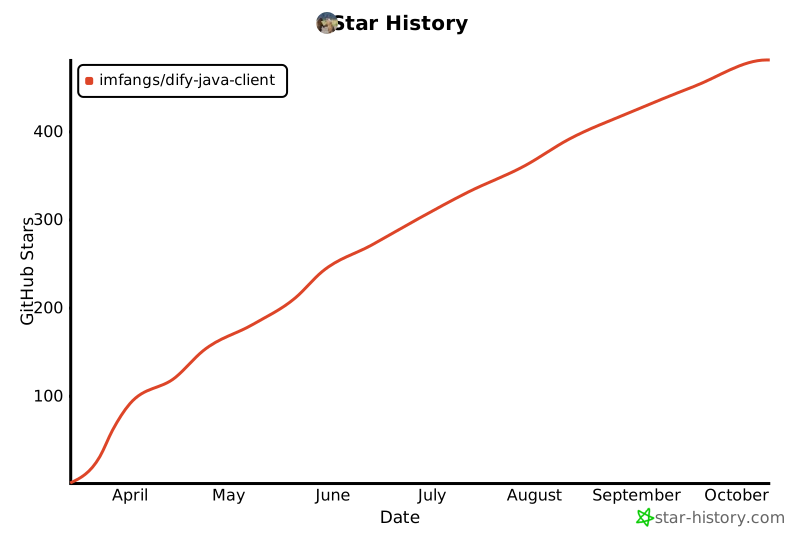](https://www.star-history.com/#imfangs/dify-java-client&Date)