# imewlconverter
**Repository Path**: studyzy/imewlconverter
## Basic Information
- **Project Name**: imewlconverter
- **Description**: 一款开源免费的输入法词库转换程序
- **Primary Language**: C#
- **License**: GPL-3.0
- **Default Branch**: master
- **Homepage**: None
- **GVP Project**: No
## Statistics
- **Stars**: 95
- **Forks**: 13
- **Created**: 2019-04-19
- **Last Updated**: 2026-05-08
## Categories & Tags
**Categories**: utils
**Tags**: None
## README
# 深蓝词库转换
[](https://github.com/studyzy/imewlconverter/stargazers)




[](https://github.com/studyzy/imewlconverter)
[](https://gitter.im/studyzy/imewlconverter?utm_source=badge&utm_medium=badge&utm_campaign=pr-badge&utm_content=badge)
[](https://github.com/studyzy/imewlconverter/releases)

一款输入法词库转换软件,支持以下超过 20 种的输入法工具和词库
本程序支持批量转换(一次拖拽多个词库文件,或者按住 Ctrl 选择多个文件),支持命令行模式(在命令行下使用-h命令查看帮助),支持 Windows、Linux、MacOS。
## 快速安装(命令行工具)
### 前置要求
- [.NET SDK 10.0+](https://dotnet.microsoft.com/download)(运行 `dotnet --version` 确认已安装)
### 从源码安装
```bash
# 1. 克隆仓库
git clone https://github.com/studyzy/imewlconverter.git
cd imewlconverter
# 2. 构建命令行工具
dotnet build src/ImeWlConverterCmd
# 3. 验证安装(查看帮助)
dotnet src/ImeWlConverterCmd/bin/Debug/net10.0/ImeWlConverterCmd.dll --help
```
构建完成后,命令行工具位于 `src/ImeWlConverterCmd/bin/Debug/net10.0/ImeWlConverterCmd.dll`。
通过 `dotnet ` 方式运行,也可以使用 `dotnet run` 简化调用:
```bash
# 方式一:直接运行 DLL
dotnet src/ImeWlConverterCmd/bin/Debug/net10.0/ImeWlConverterCmd.dll --help
# 方式二:使用 dotnet run(自动构建并运行,注意 -- 分隔符)
dotnet run --project src/ImeWlConverterCmd -- --help
```
### 使用 Makefile(推荐)
项目提供了 Makefile 简化构建流程:
```bash
git clone https://github.com/studyzy/imewlconverter.git
cd imewlconverter
make build-cmd # Debug 模式构建
# 或
DOTNET_CONFIG=Release make build-cmd # Release 模式构建
```
## 支持列表
PC 端:
- Chinese-pyim(Linux)
- [FIT 输入法(Mac)](https://github.com/studyzy/imewlconverter/wiki/FIT)
- libpinyin(Linux)
- [MacOS 自带简体拼音](https://github.com/studyzy/imewlconverter/wiki/MacPlist)
- [QQ 拼音(文本词库和 qpyd 格式分类词库)](https://github.com/studyzy/imewlconverter/wiki/QQ_Pinyin_Win)
- [QQ 五笔](https://github.com/studyzy/imewlconverter/wiki/QQ_Wubi)
- [Rime 输入法(Linux 中州韻、Windows 小狼毫、Mac OS 鼠鬚管)](https://github.com/studyzy/imewlconverter/wiki/Rime)
- [Win10 微软拼音](https://github.com/studyzy/imewlconverter/wiki/Win10Ms_Pinyin)
- [Win10 微软五笔](https://github.com/studyzy/imewlconverter/wiki/Win10Ms_Wubi)
- [百度拼音 PC(文本词库、bdict 格式)](https://github.com/studyzy/imewlconverter/wiki/Baidu_PC)
- [必应输入法](https://github.com/studyzy/imewlconverter/wiki/Engkoo)
- 仓颉平台
- [谷歌拼音](https://github.com/studyzy/imewlconverter/wiki/Google_Pinyin)
- [极点五笔](https://github.com/studyzy/imewlconverter/wiki/Jidian)
- [极点郑码](https://github.com/studyzy/imewlconverter/wiki/Jidian)
- [灵格斯词库 ld2](https://github.com/studyzy/imewlconverter/wiki/Lingoes_Ld2)
- [拼音加加](https://github.com/studyzy/imewlconverter/wiki/Pinyin_Jiajia)
- 手心输入法
- [搜狗拼音(文本词库、Bin 格式备份词库和 scel 格式细胞词库)](https://github.com/studyzy/imewlconverter/wiki/Sougou_Pinyin)
- [搜狗五笔](https://github.com/studyzy/imewlconverter/wiki/Sougou_Wubi)
- [微软拼音 2010](https://github.com/studyzy/imewlconverter/wiki/Ms_Pinyin)
- [小小输入法(拼音、五笔、郑码、二笔)](https://github.com/studyzy/imewlconverter/wiki/Xiaoxiao)
- [小鸭五笔](https://github.com/studyzy/imewlconverter/wiki/Xiaoya_Wubi)
- [新浪拼音](https://github.com/studyzy/imewlconverter/wiki/Sina_Pinyin)
- [雅虎奇摩输入法(注音)](https://github.com/studyzy/imewlconverter/wiki/Yahoo)
- [紫光拼音(文本词库和 uwl 格式分类词库)](https://github.com/studyzy/imewlconverter/wiki/Ziguang_Pinyin)
- 自定义格式
手机端:
- QQ 手机拼音
- 百度手机拼音(文本词库和 bcd 格式)
- 谷歌拼音输入法
该软件支持 6 种以上的输入法编码方法:
- 仓颉
- 二笔(超强二笔,青松二笔等)
- 拼音(全拼、双拼)
- 五笔(五笔 86、五笔 98、新世纪五笔)
- 郑码
- 注音
- 自定义
## 命令行使用
### 基本语法
```bash
# 使用 dotnet 运行(将 替换为实际的 DLL 路径)
dotnet -i <输入格式> -o <输出格式> -O <输出文件> <输入文件>
# 如果设置了别名或使用 dotnet run
imewlconverter -i <输入格式> -o <输出格式> -O <输出文件> <输入文件>
```
### 格式代码速查表
| 格式代码 | 说明 | 文件扩展名 | 支持导入 | 支持导出 |
|---------|------|-----------|:-------:|:-------:|
| `scel` | 搜狗拼音细胞词库 | .scel | ✅ | ✅ |
| `sgpy` | 搜狗拼音文本格式 | .txt | ✅ | ✅ |
| `sgpybin` | 搜狗拼音备份词库 | .bin | ✅ | ❌ |
| `qqpy` | QQ 拼音文本格式 | .txt | ✅ | ✅ |
| `qpyd` | QQ 拼音分类词库 | .qpyd | ✅ | ❌ |
| `qcel` | QQ 拼音细胞词库 | .qcel | ✅ | ❌ |
| `ggpy` | 谷歌拼音 | .txt | ✅ | ✅ |
| `bdpy` | 百度拼音文本格式 | .txt | ✅ | ✅ |
| `bdict` | 百度拼音二进制格式 | .bdict | ✅ | ❌ |
| `rime` | Rime 输入法 | .yaml | ✅ | ✅ |
| `zgpy` | 紫光拼音 | .txt | ✅ | ✅ |
| `pyjj` | 拼音加加 | .txt | ✅ | ✅ |
| `libpy` | libpinyin (Linux) | .txt | ✅ | ✅ |
| `plist` | macOS 系统拼音 | .plist | ✅ | ✅ |
| `fit` | FIT 输入法 (Mac) | .txt | ✅ | ✅ |
| `self` | 自定义格式 | .txt | ✅ | ✅ |
> 运行 `--list-formats` 可查看当前版本支持的完整格式列表。
### 常用示例
**搜狗 scel 细胞词库转搜狗拼音 txt 格式**:
```bash
dotnet ImeWlConverterCmd.dll -i scel -o sgpy -O output.txt input.scel
```
**搜狗 scel 细胞词库转谷歌拼音格式**:
```bash
dotnet ImeWlConverterCmd.dll -i scel -o ggpy -O output.txt input.scel
```
**搜狗 scel 细胞词库转 Rime 格式**:
```bash
dotnet ImeWlConverterCmd.dll -i scel -o rime -O output.yaml input.scel
```
**多文件转换**:
```bash
dotnet ImeWlConverterCmd.dll -i scel -o ggpy -O output.txt file1.scel file2.scel file3.scel
```
**批量转换到目录**(输出目录以 `/` 结尾):
```bash
dotnet ImeWlConverterCmd.dll -i scel -o ggpy -O ./output/ *.scel
```
**使用过滤器**:
```bash
dotnet ImeWlConverterCmd.dll -i scel -o ggpy -O output.txt -f "len:1-100|rm:eng|rm:num" input.scel
```
**查看帮助和格式列表**:
```bash
dotnet ImeWlConverterCmd.dll --help
dotnet ImeWlConverterCmd.dll --list-formats
```
### 完整使用示例(从安装到转换)
以下示例展示从克隆仓库到完成词库转换的完整流程:
```bash
# 1. 克隆并构建
git clone https://github.com/studyzy/imewlconverter.git
cd imewlconverter
dotnet build src/ImeWlConverterCmd
# 2. 将搜狗 scel 词库转为搜狗拼音 txt 格式
dotnet src/ImeWlConverterCmd/bin/Debug/net10.0/ImeWlConverterCmd.dll \
-i scel -o sgpy -O 唐诗300首.txt \
"src/ImeWlConverterCoreTest/Test/唐诗300首【官方推荐】.scel"
# 3. 将搜狗 scel 词库转为 Rime 格式
dotnet src/ImeWlConverterCmd/bin/Debug/net10.0/ImeWlConverterCmd.dll \
-i scel -o rime -O 唐诗300首.yaml \
"src/ImeWlConverterCoreTest/Test/唐诗300首【官方推荐】.scel"
```
也可以使用 `dotnet run` 方式运行(无需关心 DLL 路径):
```bash
cd imewlconverter
dotnet run --project src/ImeWlConverterCmd -- \
-i scel -o sgpy -O 唐诗300首.txt \
"src/ImeWlConverterCoreTest/Test/唐诗300首【官方推荐】.scel"
```
### 重要说明
从 v3.0.0 开始,命令行参数格式已更新为 GNU 风格。如果您使用的是旧格式(如 `-i:scel`),请参阅 [MIGRATION.md](docs/MIGRATION.md) 进行迁移。
## 集成测试
本项目包含完整的集成测试框架,确保各种输入法格式之间的转换正确性。
### 快速运行测试
```bash
# 1. 编译CLI工具
cd src/ImeWlConverterCmd
dotnet build -c Release
# 2. 运行集成测试
cd ../../tests/integration
./run-tests.sh --all
```
### 测试覆盖范围
当前已实现:
- ✅ 导入测试(多种输入格式 → 统一CSV格式)
- ✅ 导出测试(统一CSV格式 → 多种输出格式)
- ✅ 高级功能测试(过滤、编码、大文件性能)
详细的测试矩阵与数据来源见 `tests/integration/TEST-MATRIX.md`。
### 更多信息
- [集成测试完整文档](tests/integration/README.md)
- [测试用例配置规范](specs/001-integration-tests/contracts/test-case-schema.yaml)
- [测试数据来源](src/ImeWlConverterCoreTest/Test/)
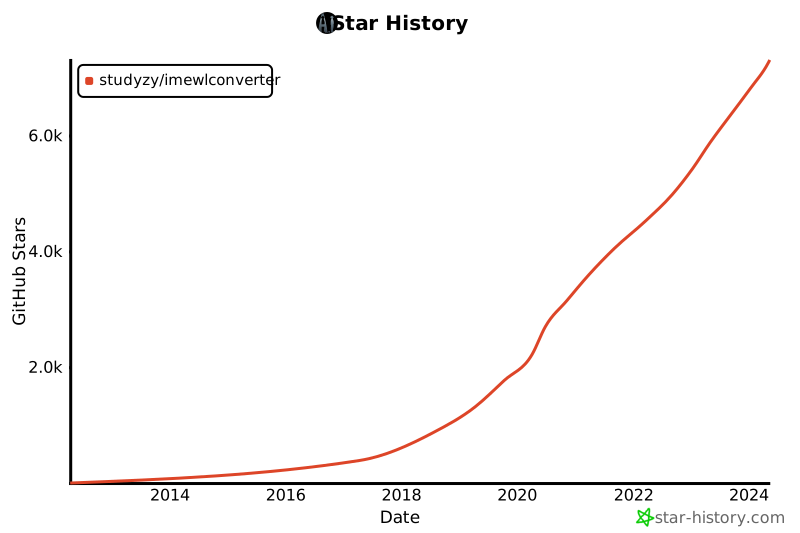
## Star History
[](https://star-history.com/#studyzy/imewlconverter&Date)