# Dnai.Editor
**Repository Path**: nothingwd/Dnai.Editor
## Basic Information
- **Project Name**: Dnai.Editor
- **Description**: Dnai Editor - Visual Scripting (Node Editor)
- **Primary Language**: Unknown
- **License**: LGPL-3.0
- **Default Branch**: master
- **Homepage**: None
- **GVP Project**: No
## Statistics
- **Stars**: 0
- **Forks**: 0
- **Created**: 2026-01-06
- **Last Updated**: 2026-01-07
## Categories & Tags
**Categories**: Uncategorized
**Tags**: None
## README

-----------------
[](https://ci.appveyor.com/project/Nicolas-Constanty/dnai-editor/branch/master)
[](https://travis-ci.org/Nicolas-Constanty/Dnai.Editor)
[](https://circleci.com/gh/Nicolas-Constanty/Duly-GUI/tree/master)
[](https://www.codefactor.io/repository/github/nicolas-constanty/dnai.editor)
[](https://www.codacy.com/app/nicolas.constanty/Dnai.Editor?utm_source=github.com&utm_medium=referral&utm_content=Nicolas-Constanty/Dnai.Editor&utm_campaign=Badge_Grade)
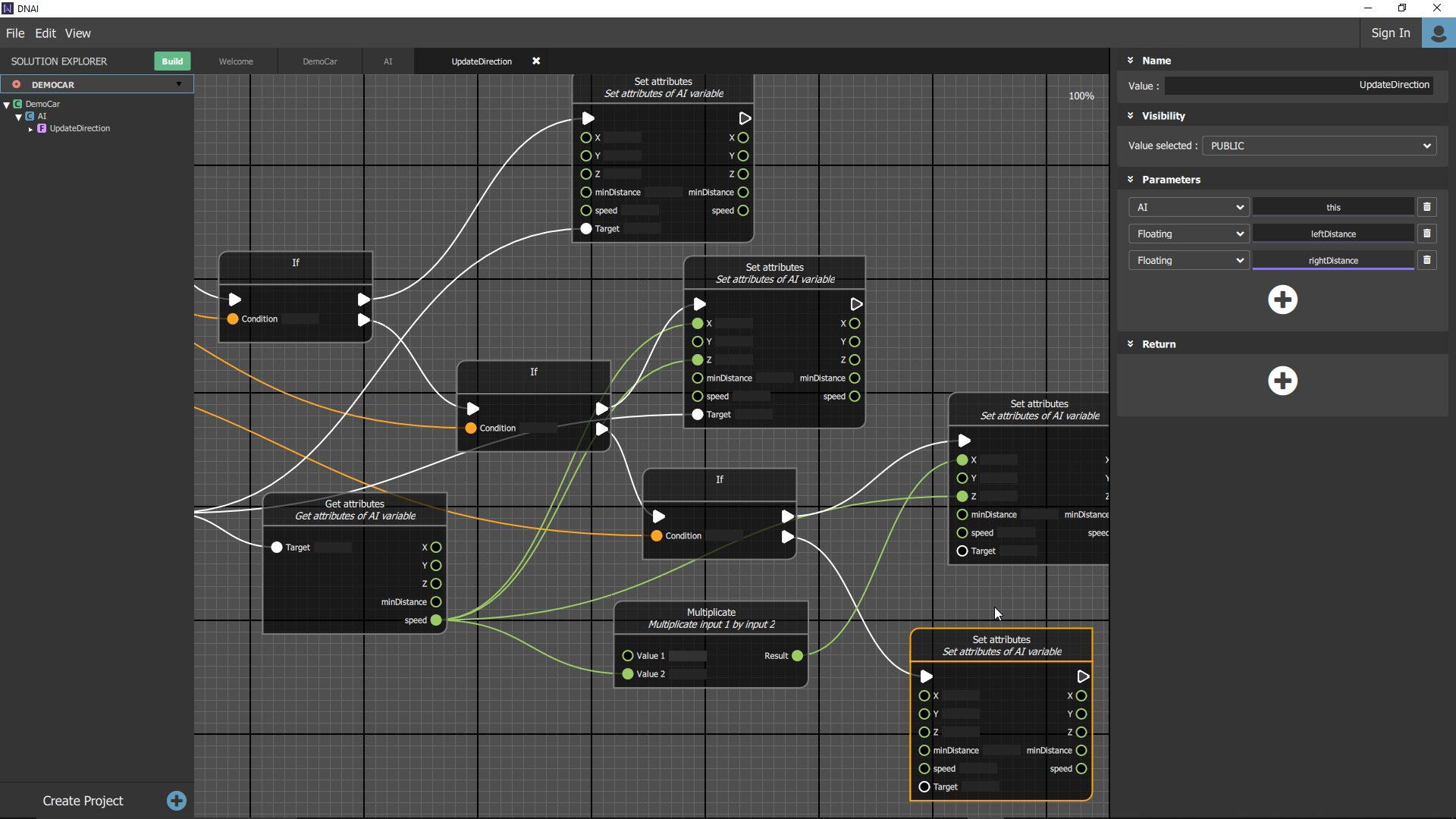
[Dnai Editor](https://code.visualstudio.com) is a visual scripting software that allow you to code with node editing. This editor allow to create ".dnai" files that you can share on our [hub](https://dnai.io/hub/).
Those ".dnai" are binary files, that can be read by our plugins.
For now we already have a Unity3D plugin, that you can find [here](https://dnai.io/download).
We are currently working on JavaScript library in order to read dnai in JS application.
## The Concept
Our main goal is to provide a way to share "logics" over different solutions :
You can download it for Windows, and macOS on [Dnai website](https://dnai.io).
## Exemple of basic case
A self-driving car can be usefull in real life but such AI are also really nice for
video games. In a very basic case, a car could use two distance sensors in order to avoid
obstacle, one the left and one the right.
The "logic" behind could be define as follow :
* **if** leftSensorDistance **<** minDistance **&&** rightSensorDistance **<** minDistance **then** stop the car.
* **if** leftSensorDistance **<** minDistance **then** turn right.
* **if** rightSensorDistance **<** minDistance **then** turn left.
If we extract the logic behind the avoidance, we can see that in video games
we use a RayCast instead of distance sensor as input for leftSensorDistance
and rightSensorDistance. As we can see the logic behind remain the same
whether you are in real life or in a video game.
The idea here, is to bring an interface that can handle such case,
for that we use our ".dnai" file created by our editor. Notice that for now we
only have a Unity3D plugin so can test it only on Unity at this point. In the
futur we want to bring JavaScript and Python capability in order to add more
compatibity and interest for our solution.
## Installation
If you want to test our editor you can get if from our website
[https://dnai.io/download](https://dnai.io/download).
You just need to follow the installation instructions, we maintain a Windows 10 and
MacOs deploiement.
## Compilation
You can compile the software using Qt >= 5.10.1, but you will need our "Core" library to run it properly.
#### Build the server
- Get the repository content
```
git clone https://github.com/Nicolas-Constanty/Dnai.Editor.git
git submodule update --init --recursive
```
- Open Dnai.Editor/Server/Server.pro with qt creator
- Build->Run qmake
- Build->Build All
#### Build the editor
- Open Dnai.Editor/Gui/DNAI.pro with qt creator (Qt >= 5.10.1)
- Build->Run qmake
- Go to Projects->Build->Add Build step->Make
- add "install" to the make argument
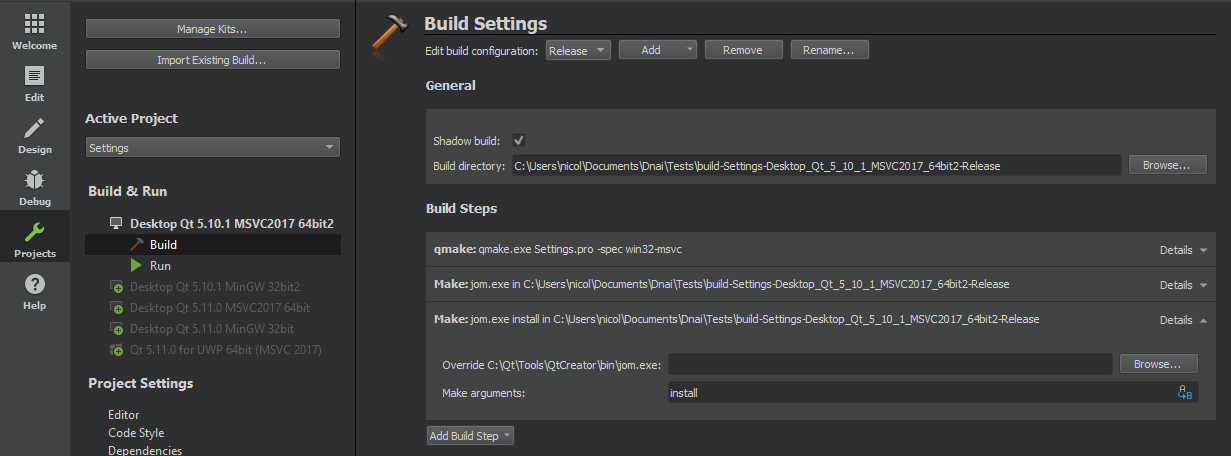
- Build->Build All
#### Install dependencies
- Our Core library sources remain private until it become more mature,
so you can get it [here](https://github.com/Nicolas-Constanty/Dnai.Editor/releases).
- Put binary files of the Server inside [YOUR BUILD DNAI FOLDER]/app _you can find your build directory in the "Projects" tab on the left_
- Put binary files of the Core inside [YOUR BUILD DNAI FOLDER]/app/Core
- Press Run on Qt
## Documentation
We need to improve our actual documentation, but for now you can find
a doxygen [here](https://nicolas-constanty.github.io/Dnai.Editor/html/classical/namespaces.html).
## Authors
**Adrien Wery** - Website API and Dnai.Editor ([github](https://github.com/Adpa18))
**Fernand Veyrier** - Dnai.Core (virtual machine for compilation) and Unity3D Plugin ([github](https://github.com/FernandVEYRIER))
**Nicolas Constanty** - Dnai.Editor and Website design ([github](https://github.com/Nicolas-Constanty))
**Quentin Gasparoto** - Dnai.Core (virtual machine for compilation) and Dnai.Editor ([github](https://github.com/GasparQ))
**Victor Gouet** - Dnai.Server, Deploiement Windows/Mac and Dnai.Editor ([github](https://github.com/Gouet))
See also the list of [contributors](https://github.com/Nicolas-Constanty/Dnai.Editor/graphs/contributors) who participated in this project.
## License
Licensed under the [(L)GPL v2/3 ](https://github.com/Nicolas-Constanty/Dnai.Editor/blob/master/LICENSE) License, with Qt Open source licence.