# wordpress-heroku
**Repository Path**: mirrors_svenanders/wordpress-heroku
## Basic Information
- **Project Name**: wordpress-heroku
- **Description**: No description available
- **Primary Language**: Unknown
- **License**: Not specified
- **Default Branch**: master
- **Homepage**: None
- **GVP Project**: No
## Statistics
- **Stars**: 0
- **Forks**: 0
- **Created**: 2020-08-18
- **Last Updated**: 2026-03-14
## Categories & Tags
**Categories**: Uncategorized
**Tags**: None
## README
# Heroku buildpack: Wordpress on Heroku
### This is a Heroku buildpack for running [Wordpress](http://wordpress.org) on [Heroku](http://heroku.com)
It uses this [Wordpress](http://github.com/mchung/wordpress-on-heroku) project template to bootstrap a highly tuned Wordpress site built on the following stack:
* `nginx` - Nginx for serving web content. Built specifically for Heroku. [See compile options](https://github.com/mchung/heroku-buildpack-wordpress/blob/master/support/package_nginx).
* `php` - PHP-FPM for process management. [See compile options](https://github.com/mchung/heroku-buildpack-wordpress/blob/master/support/package_php).
* `wordpress` - Downloaded directly [from wordpress.org](http://wordpress.org/download/release-archive/).
* `MySQL` - ClearDB for the MySQL backend.
* `Sendgrid` - Sendgrid for the email backend.
* `MemCachier` - MemCachier for the memcached backend.
You can see a live demo at [Wordpress on Heroku](http://wordpress-on-heroku.herokuapp.com).
## Getting started in 60 seconds
Fork and rename the [Wordpress project template](http://github.com/mchung/wordpress-on-heroku).
Let's clone the repository for a new blog, 99catfacts.com
```bash
$ git clone git://github.com/your_name/wordpress-on-heroku.git 99catfacts.com
```
Create Wordpress on Heroku.
```bash
$ cd 99catfacts.com
$ heroku create -s cedar
$ heroku config:add BUILDPACK_URL=https://github.com/mchung/heroku-buildpack-wordpress.git
```
> Don't have the Heroku Toolbelt installed? Follow these [quickstart instructions](https://devcenter.heroku.com/articles/quickstart). Takes about 2 minutes.
Deploy your Wordpress site to Heroku.
```bash
$ git push heroku master
...
-----> Heroku receiving push
-----> Fetching custom git buildpack... done
-----> Wordpress app detected
.
[...]
.
-----> Discovering process types
Procfile declares types -> (none)
Default types for Wordpress -> web
-----> Compiled slug size: 33.7MB
-----> Launching... done, v7
```
Open your new Wordpress site in a web browser.
```bash
$ heroku apps:open
```
> Happy? Add your site to the growing [list of Wordpress sites runnning on Heroku](https://github.com/mchung/heroku-buildpack-wordpress/wiki/Sites-running-Wordpress-on-Heroku).
## Overview
The buildpack bootstraps a Wordpress site using the [mchung/wordpress-on-heroku](http://github.com/mchung/wordpress-on-heroku) project template. That repo contains everything required to run your own Wordpress site on Heroku.
There are several files available in `config` for configuring your new Wordpress site.
```
└── config # Your config files goes here.
├── public # The public directory
│ └── wp-content # Wordpress themes and plugins
│ ├── plugins
│ └── themes
└── vendor # Config files for vendored apps
├── nginx
│ └── conf # nginx.conf + your site.conf
└── php
└── etc # php.ini & php-fpm.conf
```
When you deploy Wordpress to Heroku, everything in `config` is copied over to Heroku. You can configure your blog by making changes to these files.
A few Wordpress environment variables can be controlled via Heroku using `heroku config:set`:
* `FORCE_SSL_LOGIN`
* `FORCE_SSL_ADMIN`
* `WP_CACHE`
* `DISABLE_WP_CRON`
* `WORDPRESS_DIR`, see [Specifying WordPress installation directory](#specifying-wordpress-installation-directory)
* `WORDPRESS_VERSION`, see [VERSIONS](VERSIONS.md)
> To add a Heroku environment variable: `heroku config:set GOOG_UA_ID=UA=1234777-9`
See `wp-config.php` and documentation from Wordpress for details.
Enabling and configuring the following Wordpress plugins will also speed up Wordpress on Heroku significantly.
* `heroku-sendgrid` - Configures phpmailer to send SMTP email with Sendgrid.
* `heroku-google-analytics` - Configures Google Analytics to display on your Wordpress site.
* GOOG_UA_ID=UA-9999999
* `wpro` - Configures Wordpress to upload everything to S3.
* `batcache` - Configures Wordpress to use memcached for caching.
* `memcachier` - Use a modern memcached plugin.
* `cloudflare` - OPTIONAL, but very awesome.
* If Cloudflare is installed, the plugin configures Wordpress to play nicely with CloudFlare. It sets the correct IP addresses from visitors and comments, and also protects Wordpress from spammers.
* Keep in mind that the free version doesn't support SSL, so you'll need to set both `FORCE_SSL_ADMIN` and `FORCE_SSL_LOGIN` to false in order to login.
## Usage
### Creating your Wordpress site on Heroku
```bash
$ git clone git://github.com/username/wordpress-on-heroku.git myblog
$ cd myblog
$ heroku create -s cedar
$ heroku config:add BUILDPACK_URL=https://github.com/mchung/heroku-buildpack-wordpress.git
$ git push heroku master
```
### Adding a custom domain name
```bash
$ heroku domains:add marcchung.org
$ heroku domains:add www.marcchung.org
```
Note: Adding a domain still requires some DNS setup work. Basically you'll want to do something like this:
```bash
ALIAS marcchung.org -> proxy.herokuapp.com
CNAME www.marcchung.org -> proxy.herokuapp.com
```
> [I use DNSimple and you should too](https://dnsimple.com/r/d2bc9a934910c1).
### Adding a theme
```bash
$ cp -r appply config/public/wp-content/themes/
$ git add .
$ git commit -m "New theme"
$ git push heroku master
```
### Adding a plugin
```bash
$ cp -r google-analytics config/public/wp-content/plugins/
$ git add .
$ git commit -m "New plugin"
$ git push heroku master
```
> Plugins and themes must be activated via the Plugins panel.
### Adding custom secret keys to wp-config.php
Use the [Wordpress.org secret-key service](https://api.wordpress.org/secret-key/1.1/salt/) to override the default ones in `wp-config.php`.
### Configuring cron
By default, wp-cron is fired on every page load and scheduled to run jobs like future posts or backups. This buildpack disables wp-cron so that visitors don't have to wait to see the site.
Heroku allows you to trigger wp-cron from their scheduler.
```bash
$ heroku addons:add scheduler:standard
# Visit the Heroku scheduler dashboard and add a new task:
./bin/cron.sh
```
Alternatively, you may also re-enable wp-cron.
```bash
$ heroku config:set DISABLE_WP_CRON=false
```
### Enable system access
The alternative PHP cache and a generic PHPINFO page is available at /apc.php and /phpinfo.php.
```bash
$ heroku config:set ENABLE_SYSTEM_DEBUG=true
$ heroku config:set SYSTEM_USERNAME=admin
$ heroku config:set SYSTEM_PASSWORD=secret123
# Visit /apc.php or /phpinfo.php
```
### Remove the PHP-FPM status page `/status.html`
Delete the directive from `nginx.conf.erb`.
### Add a `favicon.ico` drop one into `public`
See [#22](https://github.com/mchung/heroku-buildpack-wordpress/issues/22) for details.
### Specifying WordPress installation directory
Specifying a WordPress installation directory may help local development as you can just unzip wordpress into a subdirectory and .gitignore that folder.
```bash
$ heroku config:set WORDPRESS_DIR=mywordpress
```
wp-config.php:
```php
define( 'WP_CONTENT_DIR', $_SERVER['DOCUMENT_ROOT'].'/wp-content' );
define( 'WP_CONTENT_URL', 'http://' . $_SERVER['HTTP_HOST'] .'/wp-content' );
define('WP_SITEURL', 'http://' . $_SERVER['HTTP_HOST'] . '/mywordpress');
```
### Choosing specific versions of vendored packages
See [VERSIONS](VERSIONS.md) for how to pick specific versions of Nginx, PHP, and Wordpress
### Workflow (optional)
By keeping your changes separate, it'll be easier to pull in changes from the Wordpress site template.
Assign a remote `upstream`
```bash
$ git remote add upstream https://github.com/your_name/wordpress-on-heroku.git
```
Track changes in a separate branch called `production`.
```bash
$ git checkout -B production
$ git push heroku production:master
# This keeps upstream (my) changes separate from (your) blog changes.
```
Pull changes from upstream into `master`.
```bash
$ git co master
$ git pull
$ git co production
$ git merge master
```
Pull changes from upstream into `production`.
```bash
$ git pull --rebase upstream master
```
## How fast is this?
Pretty freaking fast.
System setup
* Single Heroku dyno
* Default Wordpress installation
* Default twentytwelve theme
* Caching turned up
* Cron disabled
* Memcachier + ClearDB
Here are some benchmarks from Google PageSpeed, Blitz.io, and Web Page Test.
### Google PageSpeed
Results from PageSpeed Insights: 94/100
[See the PageSpeed report](https://developers.google.com/speed/pagespeed/insights#url=wordpress-on-heroku.herokuapp.com&mobile=false)
### blitz.io
Results from a blitz.io rush
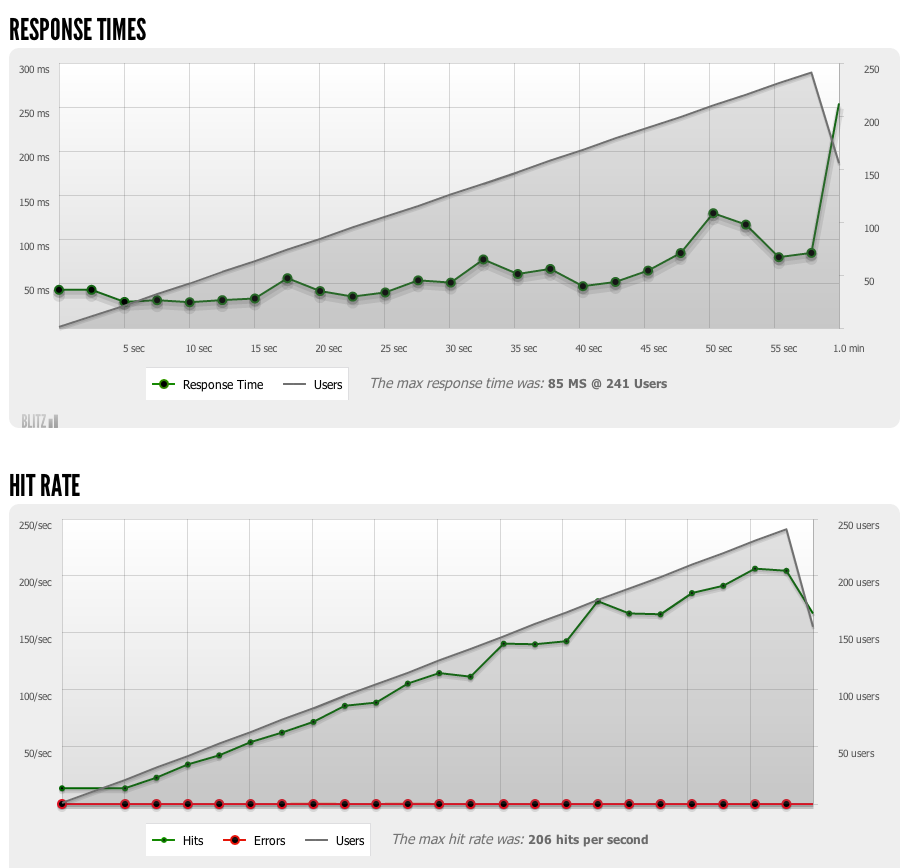
Over 200 page views per second with less than 100ms response time sustained for a minute.
[See the Blitz.io report](https://www.blitz.io/report/541eb908b4ef3eec8d9c2ce2293a85ca)
### Web Page Performance Test
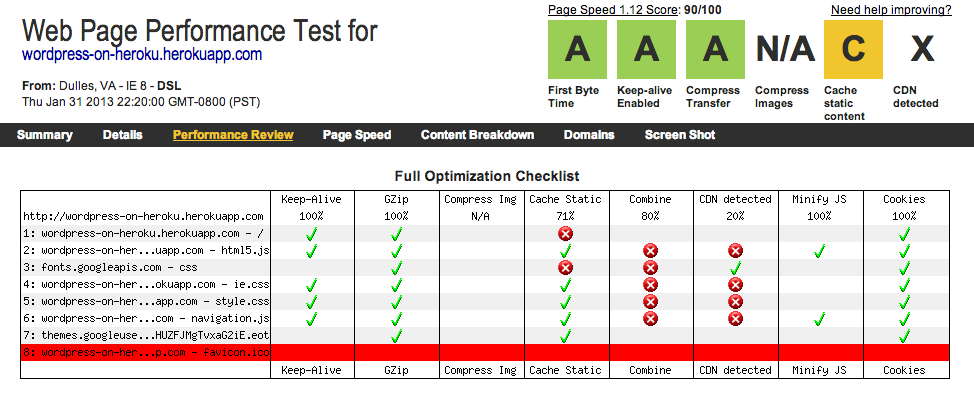
[See the WebPageTest report](http://www.webpagetest.org/result/130201_BB_624/)
These tests are periodically rerun on [Wordpress on Heroku](http://wordpress-on-heroku.herokuapp.com).
## But doesn't Heroku only run Ruby applications?
Not anymore. Heroku's latest offerings (See [Celadon Cedar stack](http://devcenter.heroku.com/articles/cedar)) makes it easy (well, easyish) for developers to install and run any language, or service.
## Constraints with Heroku
The [ephemeral filesystem](http://devcenter.heroku.com/articles/dyno-isolation)
* End-users cannot upload media assets to Heroku. WORKAROUND: Enable `wpro` and use that plugin to upload media assets to S3 instead.
* End-users cannot update themes or plugins from the admin page. WORKAROUND: Add them to `config/public/wp-content/themes` or `config/public/wp-content/plugins` then push to Heroku.
## Security disclosure
Each time Wordpress is deployed, Heroku will fetch the latest buildpack from GitHub and execute the instructions in `compile` and `deploy`. This buildpack will download the latest precompiled versions of Nginx, PHP, and Wordpress from my personal [S3 bucket](http://heroku-buildpack-wordpress.s3.amazonaws.com) then add in config files from the [`config`](https://github.com/mchung/wordpress-on-heroku/tree/master/config) directory.
## Hacking and Contributing
Not comfortable downloading and running a copy of someone else's PHP or Nginx executables? Not a problem! The `support` directory also contains a handful of compilation and deployment scripts to automate several processes, which are currently used for maintenance and repo management.
* `package_nginx` - Used to compile and upload the latest version of Nginx to S3.
* `package_php` - Used to compile and upload the latest version of PHP to S3.
* `wordup` - Really useful helper script for creating and destroying Wordpress sites.
## TODO
* End-users shouldn't be able to do things that aren't supported on Heroku. Write plugins to hide everything.
* Integrate New Relic.
* CDN support.
* Combine CSS/JS files
## Authors and Contributors
* Marc Chung - Follow [@mchung](https://github.com/mchung) on GitHub and also [@heisenthought](https://twitter.com/heisenthought) on Twitter
* Oskari Okko Ojala - [@okko](https://github.com/okko) on GitHub, [@okko](https://twitter.com/okko) on Twitter
* Luis Herranz - [@LuisHerranz](https://github.com/LuisHerranz) on Github, [@luisherranz](https://twitter.com/luisherranz) on Twitter
## Thanks
Thanks for reading this all the way through.
If you use this buildpack in production, please update the [list of Wordpress sites running on Heroku](https://github.com/mchung/heroku-buildpack-wordpress/wiki/Sites-running-Wordpress-on-Heroku).
## License
The MIT License - Copyright (c) 2013 Marc Chung