# vscode
**Repository Path**: mirrors_cucumber/vscode
## Basic Information
- **Project Name**: vscode
- **Description**: Official Visual Studio Code Extension for Cucumber
- **Primary Language**: Unknown
- **License**: MIT
- **Default Branch**: main
- **Homepage**: None
- **GVP Project**: No
## Statistics
- **Stars**: 0
- **Forks**: 0
- **Created**: 2021-10-22
- **Last Updated**: 2026-05-17
## Categories & Tags
**Categories**: Uncategorized
**Tags**: None
## README

Cucumber for VSCode
Official Visual Studio Code extension for Cucumber and Gherkin





Maintained by the [Cucumber team](https://github.com/cucumber/) and powered by the [Cucumber Language Server](https://github.com/cucumber/language-server#readme).
Available from the [Open VSX Registry](https://open-vsx.org/extension/CucumberOpen/cucumber-official) and
[Visual Studio Marketplace](https://marketplace.visualstudio.com/items?itemName=CucumberOpen.cucumber-official).
## Features
- ⌨️ [Autocomplete steps](#autocomplete)
- 📍 [Go to step definition](#go-to-step-definition)
- 🪄 [Generate step definition](#generate-step-definition)
- 💄 [Syntax highlighting](#syntax-highlighting)
- ✨ [Formatting](#formatting)
- 🌎 [Gherkin localisation](#gherkin-localisation)
- 📖 [Language support](#language-support)
- C#/SpecFlow
- Go/Godog
- Java
- JavaScript
- PHP
- Python/Behave
- Ruby
- Rust
- TypeScript
- 🗂 [Document outline](#document-outline)
- 🥒 [Feature file icons](#feature-file-icons)
### Autocomplete
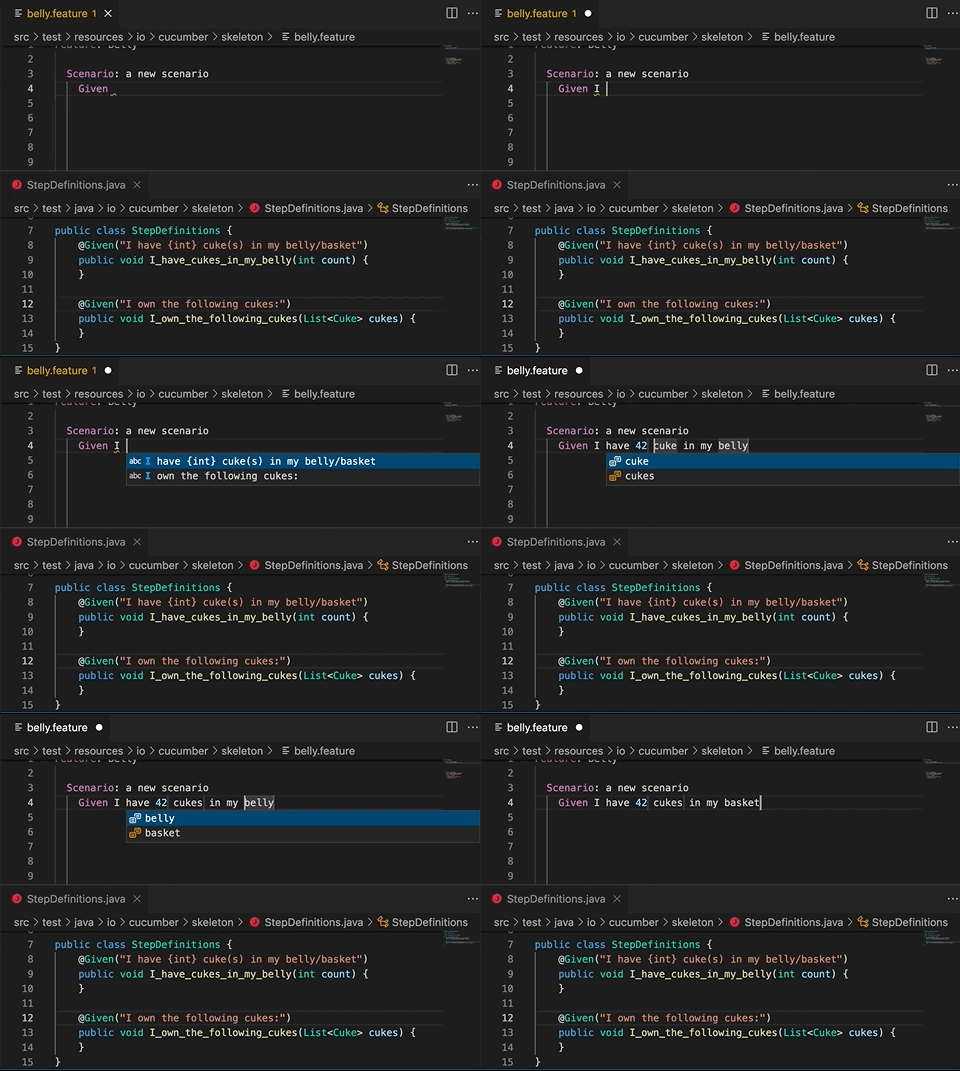
When you start typing a step, you will see auto-complete suggestions
based on existing step definitions and Gherkin steps.
The suggestions are more helpful if your step definitions use
[Cucumber Expressions](https://github.com/cucumber/cucumber-expressions#readme)
but you'll also get suggestions if they use Regular Expressions.
### Go to step definition
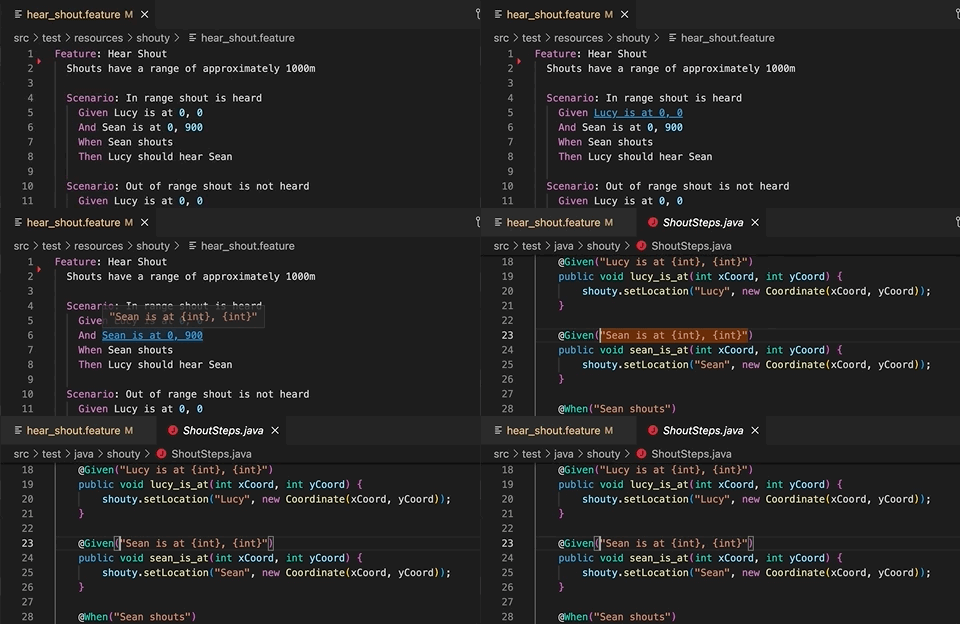
You can quickly navigate from a Gherkin step to a step definition.
### Generate step definition
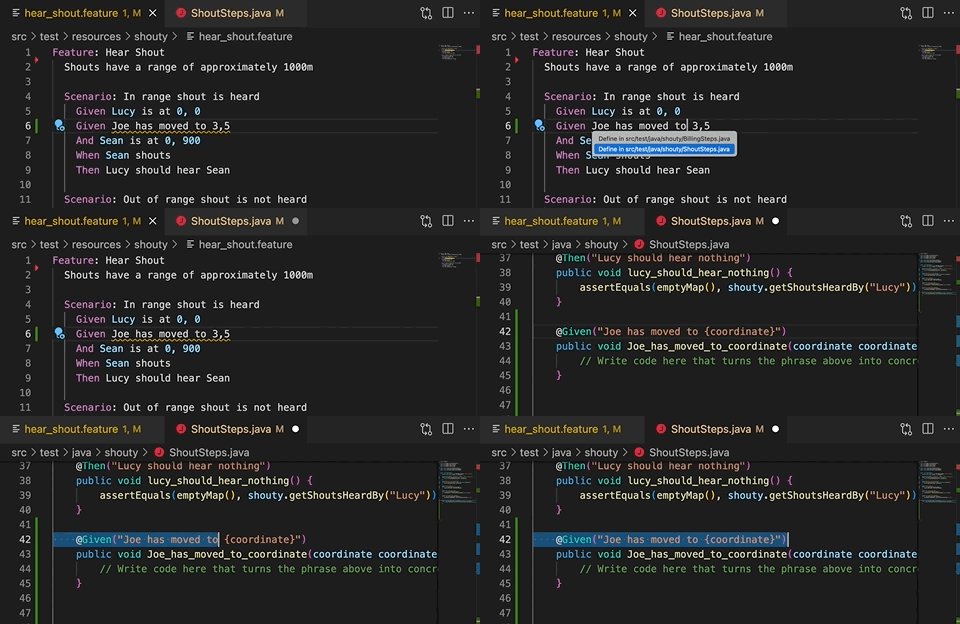
Generate step definition snippets with a quick fix - `⌘` + `.` (MacOS) or
`Ctrl` + `.` (Windows).
_IMPORTANT_: Generate step definition will only be enabled
if there is at least one existing step definition. This is
so that the extension can determine the programming language
for the step definition, and provide choices for existing files
to add it to.
### Syntax highlighting
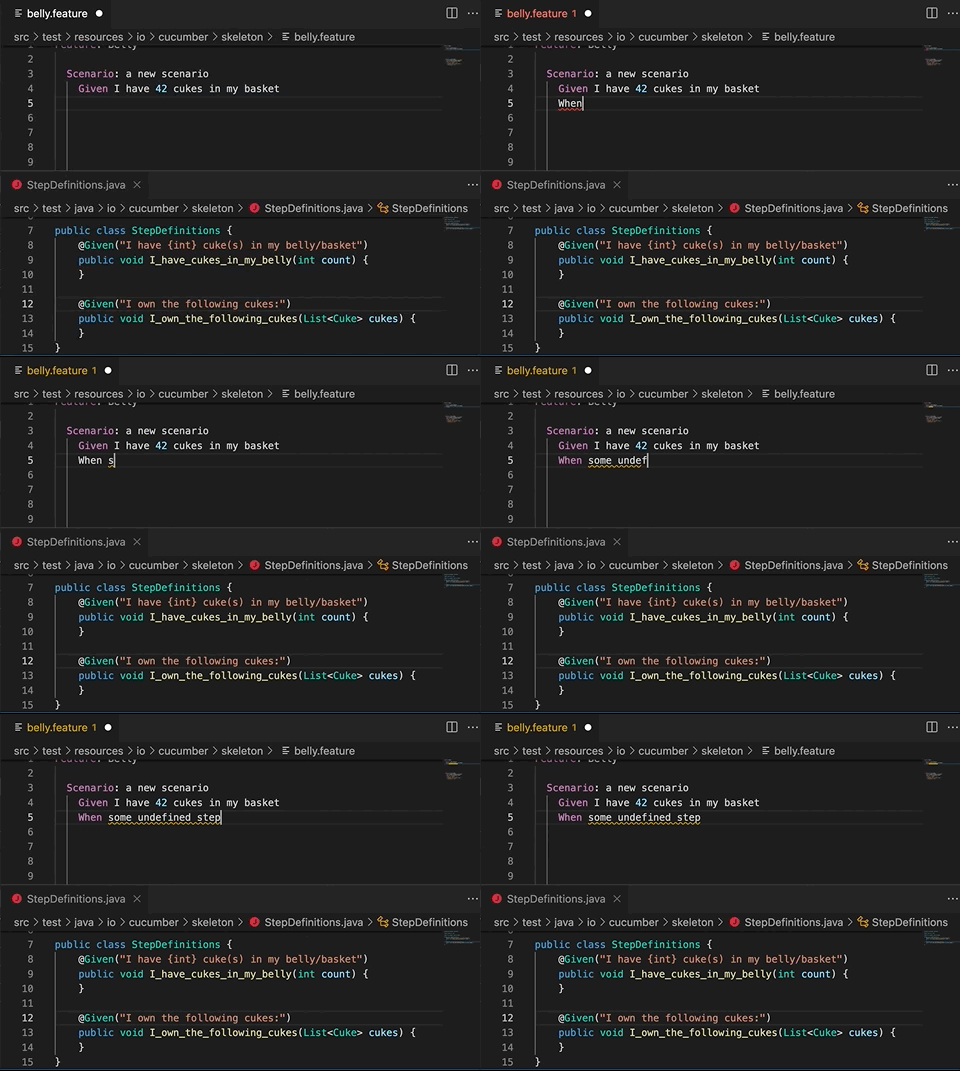
Gherkin keywords and step parameters are highlighted.
Undefined steps and syntax errors are underlined.
### Formatting
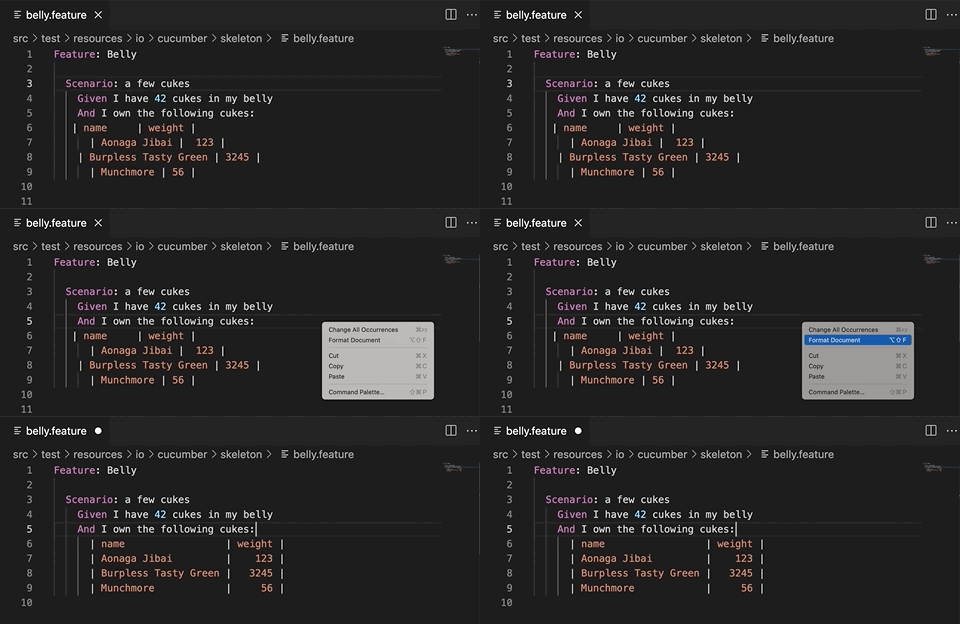
Gherkin documents are formatted using two space indentation.
Numeric cells are right-aligned (as in Excel). Non-numeric cells are left-aligned.
### Document Outline
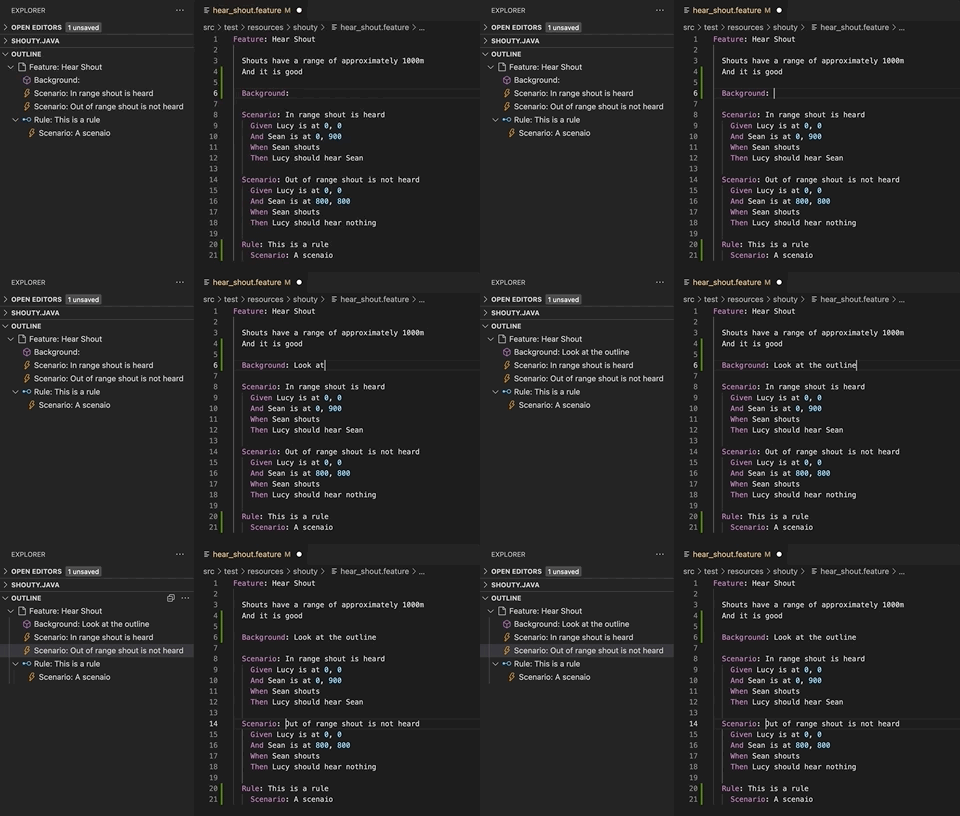
The Outline panel displays an outline of the Gherkin document,
making it easy to navigate between scenarios.
### Gherkin Localisation
Gherkin supports many translations. To specify a translation, include a `# language: ` header in your feature file, with a supported language key from the [localisation documentation](https://cucumber.io/docs/gherkin/languages/).
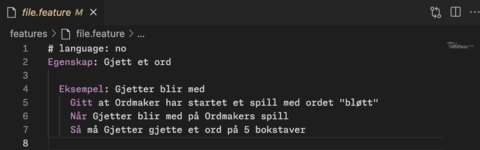
New translations or updates are welcome and can be submitted through the [gherkin parser](https://github.com/cucumber/gherkin).
### Language Support
Step definitions support is provided for [different languages and frameworks](#features).
If you experience an issue with a supported language, please [raise a detailed bug report](https://github.com/cucumber/vscode/issues) or reach out for help through [our Discord community](https://cucumber.io/docs/community/get-in-touch#discord).
If your language or framework is unsupported, please [open an issue](https://github.com/cucumber/language-service/issues) or [raise a pull request](https://github.com/cucumber/language-service/pulls) in the [Cucumber Language Service](https://github.com/cucumber/language-service) - where language support is implemented.
### Feature File Icons
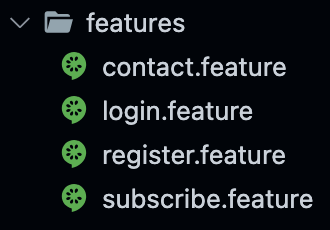
The Cucumber icon is applied to all feature files in your workspace. This replaces the default document icon, making it easier to identify your feature files at a glance.
## Extension Settings
In most cases you shouldn't need to specify any settings
as the extension comes with reasonable defaults.
If your `.feature` files and step definition files are
in an unconventional file structure, you need to change the
settings to make autocomplete work properly.
With multi-root workspaces, you will need to either specify glob paths for each workspace individually (e.g. `workspace-a/features/*.feature` and `workspace-b/features/*.feature`) or specify a glob path that matches all of them (e.g. `**/features/*.feature`). See [VSCode documentation for configuring a multi-root workspace](https://code.visualstudio.com/docs/editor/multi-root-workspaces#_workspace-file-schema).
### `cucumber.features`
[//]: # ()
The `cucumber.features` setting overrides where the extension
should look for `.feature` files.
If no feature files are found, [autocomplete](#autocomplete)
will not work.
Default value:
```json
{
"cucumber.features": [
"src/test/**/*.feature",
"features/**/*.feature",
"tests/**/*.feature",
"*specs*/**/*.feature"
]
}
```
[//]: # ()
### `cucumber.glue`
[//]: # ()
The `cucumber.glue` setting overrides where the extension
should look for source code where step definitions and
parameter types are defined.
If no glue files are found, [autocomplete](#autocomplete)
will not work, and all Gherkin steps will be underlined as
undefined. [Generate step definition](#generate-step-definition)
will not work either.
Default value:
```json
{
"cucumber.glue": [
"*specs*/**/*.cs",
"features/**/*.js",
"features/**/*.jsx",
"features/**/*.php",
"features/**/*.py",
"features/**/*.rs",
"features/**/*.rb",
"features/**/*.ts",
"features/**/*.tsx",
"features/**/*_test.go",
"src/test/**/*.java",
"tests/**/*.py",
"tests/**/*.rs"
]
}
```
[//]: # ()
### `cucumber.parameterTypes`
[//]: # ()
Override the `cucumber.parameterTypes` setting if your Cucumber Expressions
are using [Custom Parameter Types](https://github.com/cucumber/cucumber-expressions#custom-parameter-types) that are defined outside your `cucumber.glue` setting.
Parameter Types in the `cucumber.glue` globs will be picked up automatically.
Default value:
```json
{
"cucumber.parameterTypes": []
}
```
For example, if you're using the `actor` parameter type from [@cucumber/screenplay](https://github.com/cucumber/screenplay.js#actors) you'll have to declare this in the `parameterTypes` setting:
````json
{
"cucumber.parameterTypes": [
{ "name": "actor", "regexp": "[A-Z][a-z]+" }
]
}
````
[//]: # ()
## Feedback
If you discover a bug, or have a suggestion for a feature request, please
submit an [issue](https://github.com/cucumber/vscode/issues).