
Matthew Hudson
💻 🚧

Rafael Terán
💻

Allan
👀

martinwepner
💻
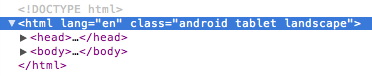
 #### Android Tablet
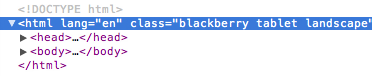
 #### Blackberry Tablet
 ### DEVICE SUPPORT
- iOS: iPhone, iPod, iPad
- macOS
- Android: Phones & Tablets
- Blackberry: Phones & Tablets
- Windows: Phones, Tablets, Desktops
- Firefox OS: Phones & Tablets
### USAGE
Just include the script. The script then updates the `` section with the
[appropriate classes](https://github.com/matthewhudson/current-device#conditional-css)
based on the device's characteristics.
## Installation
```sh
npm install current-device
```
And then import it:
```js
// using es modules
import device from "current-device";
// common.js
const device = require("current-device").default;
```
Or use script tags and globals.
```html
```
And then access it off the global like so:
```js
console.log("device.mobile() === %s", device.mobile());
```
### CONDITIONAL CSS
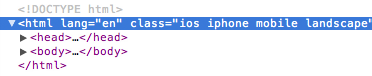
The following tables map which CSS classes are added based on device and
orientation.
#### Device CSS Class Names
### DEVICE SUPPORT
- iOS: iPhone, iPod, iPad
- macOS
- Android: Phones & Tablets
- Blackberry: Phones & Tablets
- Windows: Phones, Tablets, Desktops
- Firefox OS: Phones & Tablets
### USAGE
Just include the script. The script then updates the `` section with the
[appropriate classes](https://github.com/matthewhudson/current-device#conditional-css)
based on the device's characteristics.
## Installation
```sh
npm install current-device
```
And then import it:
```js
// using es modules
import device from "current-device";
// common.js
const device = require("current-device").default;
```
Or use script tags and globals.
```html
```
And then access it off the global like so:
```js
console.log("device.mobile() === %s", device.mobile());
```
### CONDITIONAL CSS
The following tables map which CSS classes are added based on device and
orientation.
#### Device CSS Class Names
| Device | CSS Classes |
|---|---|
| iPad | ios ipad tablet |
| iPhone | ios iphone mobile |
| iPod | ios ipod mobile |
| Mac | macos desktop |
| Android Phone | android mobile |
| Android Tablet | android tablet |
| BlackBerry Phone | blackberry mobile |
| BlackBerry Tablet | blackberry tablet |
| Windows Phone | windows mobile |
| Windows Tablet | windows tablet |
| Windows Desktop | windows desktop |
| Firefox OS Phone | fxos mobile |
| Firefox OS Tablet | fxos tablet |
| MeeGo | meego |
| Desktop | desktop |
| Television | television |
| Orientation | CSS Classes |
|---|---|
| Landscape | landscape |
| Portrait | portrait |
| Device | JavaScript Method |
|---|---|
| Mobile | device.mobile() |
| Tablet | device.tablet() |
| Desktop | device.desktop() |
| iOS | device.ios() |
| iPad | device.ipad() |
| iPhone | device.iphone() |
| iPod | device.ipod() |
| Mac | device.macos() |
| Android | device.android() |
| Android Phone | device.androidPhone() |
| Android Tablet | device.androidTablet() |
| BlackBerry | device.blackberry() |
| BlackBerry Phone | device.blackberryPhone() |
| BlackBerry Tablet | device.blackberryTablet() |
| Windows | device.windows() |
| Windows Phone | device.windowsPhone() |
| Windows Tablet | device.windowsTablet() |
| Firefox OS | device.fxos() |
| Firefox OS Phone | device.fxosPhone() |
| Firefox OS Tablet | device.fxosTablet() |
| MeeGo | device.meego() |
| Television | device.television() |
| Orientation | JavaScript Method |
|---|---|
| Landscape | device.landscape() |
| Portrait | device.portrait() |
| JS Property | Returns |
|---|---|
| device.type | 'mobile', 'tablet', 'desktop', or 'unknown' |
| device.orientation | 'landscape', 'portrait', or 'unknown' |
| device.os | 'ios', 'iphone', 'ipad', 'ipod', 'android', 'blackberry', 'windows', 'macos', 'fxos', 'meego', 'television', or 'unknown' |
Matthew Hudson 💻 🚧 |
Rafael Terán 💻 |
Allan 👀 |
martinwepner 💻 |