# AgentCPM-GUI
**Repository Path**: github-rocks/AgentCPM-GUI
## Basic Information
- **Project Name**: AgentCPM-GUI
- **Description**: AgentCPM-GUI: An on-device GUI agent for operating Android apps, enhancing reasoning ability with reinforcement fine-tuning for efficient task execution.
- **Primary Language**: Unknown
- **License**: Apache-2.0
- **Default Branch**: main
- **Homepage**: None
- **GVP Project**: No
## Statistics
- **Stars**: 0
- **Forks**: 0
- **Created**: 2026-04-02
- **Last Updated**: 2026-04-02
## Categories & Tags
**Categories**: Uncategorized
**Tags**: None
## README
【English | 中文】
概述 •
快速开始 •
模型 •
评测数据 •
技术报告
## 更新日志
* [2025.05.13] 🚀🚀🚀 我们开源了AgentCPM-GUI,面向端侧的GUI Agent,拥有中英文APP操作能力,并基于RFT优化思考能力。
## 概述
**AgentCPM-GUI**是由[清华大学THUNLP实验室](https://nlp.csai.tsinghua.edu.cn)与[面壁智能](https://modelbest.cn/en)团队联合开发的开源端侧智能体大模型,基于[MiniCPM-V](https://github.com/OpenBMB/MiniCPM-V)构建,总参数量8B,接受手机屏幕图像作为输入,自动执行用户提出的任务。AgentCPM-GUI的主要特性包括:
- **高质量GUI Grounding**:通过在大规模中英文Android数据集上进行预训练,有效提升了对常见GUI控件(如按钮、输入框、标签、图标等)的定位与理解能力;
- **中文APP操作能力**:首个针对中文APP精细优化的开源GUI Agent,覆盖高德地图、大众点评、哔哩哔哩、小红书等30余个主流中文APP;
- **增强的规划推理能力**:通过强化微调技术(RFT),让模型输出动作前进行推理思考,有效提升复杂任务执行的成功率;
- **紧凑的动作空间设计**:采用优化的动作空间和紧凑的JSON格式,平均动作长度压缩至9.7个token,提升端侧推理的效率。
任务示例(1倍速):
https://github.com/user-attachments/assets/694d3c2c-12ce-4084-8feb-4937ca9ad247
## 快速开始
### 安装依赖
```bash
git clone https://github.com/OpenBMB/AgentCPM-GUI
cd MiniCPM-Agent
conda create -n gui_agent python=3.11
conda activate gui_agent
pip install -r requirements.txt
```
### 模型下载
从Hugging face下载模型[AgentCPM-GUI](https://huggingface.co/openbmb/AgentCPM-GUI),将模型保存于目录 ``model/AgentCPM-GUI``
#### Huggingface推理
```python
import torch
from transformers import AutoTokenizer, AutoModelForCausalLM
from PIL import Image
import json
# 1. 加载模型和分词器
model_path = "model/AgentCPM-GUI" # 模型路径
tokenizer = AutoTokenizer.from_pretrained(model_path, trust_remote_code=True)
model = AutoModelForCausalLM.from_pretrained(model_path, trust_remote_code=True, torch_dtype=torch.bfloat16)
model = model.to("cuda:0")
# 2. 构造输入
instruction = "请点击屏幕上的‘会员’按钮" # 示例指令
image_path = "assets/test.jpeg" # 你的图片路径
image = Image.open(image_path).convert("RGB")
# 3. 将图片长边缩放至1120以降低计算和显存压力
def __resize__(origin_img):
resolution = origin_img.size
w,h = resolution
max_line_res = 1120
if max_line_res is not None:
max_line = max_line_res
if h > max_line:
w = int(w * max_line / h)
h = max_line
if w > max_line:
h = int(h * max_line / w)
w = max_line
img = origin_img.resize((w,h),resample=Image.Resampling.LANCZOS)
return img
image = __resize__(image)
# 4. 构造消息格式
messages = [{
"role": "user",
"content": [
f"{instruction}\n当前屏幕截图:",
image
]
}]
# 5. 推理
ACTION_SCHEMA = json.load(open('eval/utils/schema/schema.json', encoding="utf-8"))
items = list(ACTION_SCHEMA.items())
insert_index = 3
items.insert(insert_index, ("required", ["thought"])) # enable/disable thought by setting it to "required"/"optional"
ACTION_SCHEMA = dict(items)
SYSTEM_PROMPT = f'''# Role
你是一名熟悉安卓系统触屏GUI操作的智能体,将根据用户的问题,分析当前界面的GUI元素和布局,生成相应的操作。
# Task
针对用户问题,根据输入的当前屏幕截图,输出下一步的操作。
# Rule
- 以紧凑JSON格式输出
- 输出操作必须遵循Schema约束
# Schema
{json.dumps(ACTION_SCHEMA, indent=None, ensure_ascii=False, separators=(',', ':'))}'''
outputs = model.chat(
image=None,
msgs=messages,
system_prompt=SYSTEM_PROMPT,
tokenizer=tokenizer,
temperature=0.1,
top_p=0.3,
n=1,
)
# 6. 输出结果
print(outputs)
```
预期输出:
```JSON
{"thought":"任务目标是点击屏幕上的‘会员’按钮。当前界面显示了应用的推荐页面,顶部有一个导航栏。点击‘会员’按钮可以访问应用的会员相关内容。","POINT":[729,69]}
```
#### vLLM推理
```bash
# 启动vLLM服务
vllm serve model/AgentCPM-GUI --served-model-name AgentCPM-GUI --tensor_parallel_size 1 --trust-remote-code
```
```python
import base64
import io
import json
import requests
from PIL import Image
# vLLM服务启动的地址和端口
END_POINT = "http://localhost:8000/v1/chat/completions" # Replace with actual endpoint
# system prompt
ACTION_SCHEMA = json.load(open('eval/utils/schema/schema.json', encoding="utf-8"))
items = list(ACTION_SCHEMA.items())
insert_index = 3
items.insert(insert_index, ("required", ["thought"])) # enable/disable thought by setting it to "required"/"optional"
ACTION_SCHEMA = dict(items)
SYSTEM_PROMPT = f'''# Role
你是一名熟悉安卓系统触屏GUI操作的智能体,将根据用户的问题,分析当前界面的GUI元素和布局,生成相应的操作。
# Task
针对用户问题,根据输入的当前屏幕截图,输出下一步的操作。
# Rule
- 以紧凑JSON格式输出
- 输出操作必须遵循Schema约束
# Schema
{json.dumps(ACTION_SCHEMA, indent=None, ensure_ascii=False, separators=(',', ':'))}'''
def encode_image(image: Image.Image) -> str:
"""Convert PIL Image to base64-encoded string."""
with io.BytesIO() as in_mem_file:
image.save(in_mem_file, format="JPEG")
in_mem_file.seek(0)
return base64.b64encode(in_mem_file.read()).decode("utf-8")
def __resize__(origin_img):
resolution = origin_img.size
w,h = resolution
max_line_res = 1120
if max_line_res is not None:
max_line = max_line_res
if h > max_line:
w = int(w * max_line / h)
h = max_line
if w > max_line:
h = int(h * max_line / w)
w = max_line
img = origin_img.resize((w,h),resample=Image.Resampling.LANCZOS)
return img
def predict(text_prompt: str, image: Image.Image):
messages = [
{"role": "system", "content": SYSTEM_PROMPT},
{"role": "user", "content": [
{"type": "text", "text": f"{text_prompt}\n当前屏幕截图:"},
{"type": "image_url", "image_url": {"url": f"data:image/jpeg;base64,{encode_image(image)}"}}
]}
]
payload = {
"model": "AgentCPM-GUI", # Your model name
"temperature": 0.1,
"messages": messages,
"max_tokens": 2048,
}
headers = {
"Content-Type": "application/json",
}
response = requests.post(END_POINT, headers=headers, json=payload)
assistant_msg = response.json()["choices"][0]["message"]["content"]
return assistant_msg
image = __resize__(Image.open("assets/test.jpeg"))
instruction = "请点击屏幕上的‘会员’按钮"
response = predict(instruction, image)
print(response)
```
## 模型微调
我们开源了训练模型的SFT和RFT代码,参考文档[SFT](sft/readme.md)和[RFT](rft/readme.md)。
## 性能评估
### Grounding Benchmark
| Model | fun2point | text2point | bbox2text | average |
| ------------------------- | -------------- | -------------- | -------------- | -------------- |
| **AgentCPM-GUI-8B** | **79.1** | **76.5** | **58.2** | **71.3** |
| Qwen2.5-VL-7B | 36.8 | 52.0 | 44.1 | 44.3 |
| Intern2.5-VL-8B | 17.2 | 24.2 | 45.9 | 29.1 |
| Intern2.5-VL-26B | 14.8 | 16.6 | 36.3 | 22.6 |
| OS-Genesis-7B | 8.3 | 5.8 | 4.0 | 6.0 |
| UI-TARS-7B | 56.8 | 66.7 | 1.4 | 41.6 |
| OS-Altas-7B | 53.6 | 60.7 | 0.4 | 38.2 |
| Aguvis-7B | 60.8 | **76.5** | 0.2 | 45.8 |
| GPT-4o | 22.1 | 19.9 | 14.3 | 18.8 |
| GPT-4o with Grounding | 44.3 | 44.0 | 14.3 | 44.2 |
### Agent Benchmark
| Dataset | Android Control-Low TM | Android Control-Low EM | Android Control-High TM | Android Control-High EM | GUI-Odyssey TM | GUI-Odyssey EM | AITZ TM | AITZ EM | Chinese APP (CAGUI) TM | Chinese APP (CAGUI) EM |
| ------------------------- | ---------------------- | ---------------------- | ----------------------- | ----------------------- | --------------- | --------------- | --------------- | --------------- | --------------- | --------------- |
| **AgentCPM-GUI-8B** | **94.39** | **90.20** | **77.70** | **69.17** | **90.85** | **74.96** | **85.71** | **76.38** | **96.86** | **91.28** |
| Qwen2.5-VL-7B | 92.11 | 82.12 | 69.65 | 57.36 | 55.33 | 40.90 | 73.16 | 57.58 | 68.53 | 48.80 |
| UI-TARS-7B | 93.52 | 88.89 | 68.53 | 60.81 | 78.79 | 57.33 | 71.74 | 55.31 | 71.01 | 53.92 |
| OS-Genesis-7B | 90.74 | 74.22 | 65.92 | 44.43 | 11.67 | 3.63 | 19.98 | 8.45 | 38.10 | 14.50 |
| OS-Atlas-7B | 73.03 | 67.25 | 70.36 | 56.53 | 91.83* | 76.76* | 74.13 | 58.45 | 81.53 | 55.89 |
| Aguvis-7B | 93.85 | 89.40 | 65.56 | 54.18 | 26.71 | 13.54 | 35.71 | 18.99 | 67.43 | 38.20 |
| OdysseyAgent-7B | 65.10 | 39.16 | 58.80 | 32.74 | 90.83 | 73.67 | 59.17 | 31.60 | 67.56 | 25.44 |
| GPT-4o | - | 19.49 | - | 20.80 | - | 20.39 | 70.00 | 35.30 | 3.67 | 3.67 |
| Gemini 2.0 | - | 28.50 | - | 60.20 | - | 3.27 | - | - | - | - |
| Claude | - | 19.40 | - | 12.50 | 60.90 | - | - | - | - | - |
> *不一致的训练/测试集划分
TM和EM分别代表**类型匹配(Type Match)**和**完全匹配(Exact Match)**。我们开源了评测所用的数据和代码,更多信息请参见[这里](eval)。
## 评测数据
我们开源了面向中文APP场景的评测数据集CAGUI,涵盖**grounding**和**agent**两类任务,详情见[Huggingface](https://huggingface.co/datasets/openbmb/CAGUI)
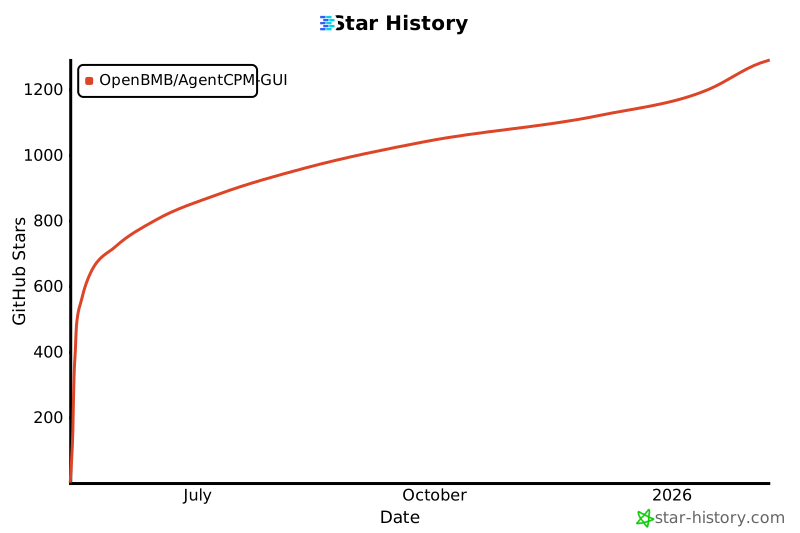
## 趋势
 ## 模型协议
* 本仓库中代码依照 [Apache-2.0](./LICENSE) 协议开源
## 引用
如果你认为该项目对你的研究有帮助,请考虑引用:
```bibtex
@misc{2025,
author = {THUNLP},
title = {AgentCPM-GUI},
year = {2025},
publisher = {GitHub},
journal = {GitHub repository},
howpublished = {\url{https://github.com/OpenBMB/AgentCPM-GUI}}
}
```
## 模型协议
* 本仓库中代码依照 [Apache-2.0](./LICENSE) 协议开源
## 引用
如果你认为该项目对你的研究有帮助,请考虑引用:
```bibtex
@misc{2025,
author = {THUNLP},
title = {AgentCPM-GUI},
year = {2025},
publisher = {GitHub},
journal = {GitHub repository},
howpublished = {\url{https://github.com/OpenBMB/AgentCPM-GUI}}
}
``` 