# saber
**Repository Path**: CPLASF000000/saber
## Basic Information
- **Project Name**: saber
- **Description**: The cross-platform open-source app built for handwriting
- **Primary Language**: Unknown
- **License**: GPL-3.0
- **Default Branch**: main
- **Homepage**: None
- **GVP Project**: No
## Statistics
- **Stars**: 0
- **Forks**: 0
- **Created**: 2026-03-30
- **Last Updated**: 2026-04-03
## Categories & Tags
**Categories**: Uncategorized
**Tags**: None
## README
#  Saber
[
Saber
[ ][google_play]
[
][google_play]
[ ][f-droid]
[
][f-droid]
[ ][app_store]
[
][app_store]
[ ][download_windows]
[
][download_windows]
[ ][flathub]
[
][flathub]
[ ][download_appimage]
[English](https://github.com/saber-notes/saber/blob/main/README.md) |
[čeština](https://github.com/saber-notes/saber/blob/main/README-cs.md) |
[Deutsch](https://github.com/saber-notes/saber/blob/main/README-de.md) |
[中文 (简体中文, 中国)](https://github.com/saber-notes/saber/blob/main/README-zh-CN.md) |
[中文 (繁體, 台灣)](https://github.com/saber-notes/saber/blob/main/README-zh-TW.md) |
[العربية](https://github.com/saber-notes/saber/blob/main/README-ar.md)
Saber 是一款专为手写而设计的笔记应用。
它的设计在尽可能简单和直观的同时仍然为您提供实际使用的独特功能。此外,Saber 可以在你所有的设备上使用,无论大屏幕还是小屏幕,并在它们之间无缝同步。
值得注意的是,当你使用黑暗模式时,它可以反转你的笔记颜色。这样你就可以在黑色背景上用白色墨水书写,在光线较暗的环境下,比如老师在课堂上关灯的时候,您可以看得更清楚。图像和 pdf 文件也可以被反转,所以您仍然可以使用数字打印输出或教科书,而不必大惊小怪。
Saber 使用双密码系统来保护您的笔记,除了您之外,任何人都无法查看您的笔记,即使他人完全控制了服务器。您可以将笔记安全地存储在 Saber 官方服务器、其他服务器或自己的服务器上!
这款应用程序完全开源,任何人都可以查看源代码,了解它的具体操作和数据处理方式。许多其他笔记应用程序都是闭源和专有的,这意味着它们的内部运作对公众来说是个谜。
作为一个学习数学的人,使用其他应用程序突出显示多行公式总是很麻烦,因为当荧光笔与自身重叠时会改变颜色。我遇到的另一个问题是,在某些应用程序中,荧光笔会显示在文本上方,使文本变淡,难以阅读。
Saber 的荧光笔就不会出现这种问题。它利用画布合成来渲染荧光笔,其处理重叠和保持颜色一致性的方式与传统纸张一致/优于传统纸张。
Saber 可以满足您整理笔记的一切需求。您可以随心所欲地创建文件夹内的文件夹,嵌套文件夹的数量不受限制。即使笔记被深埋在嵌套文件夹中,您仍然可以通过主屏幕上的最新笔记轻松访问它。
使用 Saber,探索一种全新的方式来捕捉和组织您的想法。无论您是学生、专业人士还是创意人士,Saber 都是您值得信赖的数字手写工具。立即下载,让您的创意自由流淌!
[](https://github.com/saber-notes/saber/releases/latest)
[](https://flathub.org/apps/details/com.adilhanney.saber)
[](https://f-droid.org/en/packages/com.adilhanney.saber/)
[](https://github.com/saber-notes/saber/releases)
[](https://flathub.org/apps/details/com.adilhanney.saber)
[](https://github.com/sponsors/adil192)
[](https://github.com/saber-notes/saber/blob/main/LICENSE.md)
[](https://hosted.weblate.org/engage/saber-notes/)
[](https://codecov.io/gh/saber-notes/saber)
][download_appimage]
[English](https://github.com/saber-notes/saber/blob/main/README.md) |
[čeština](https://github.com/saber-notes/saber/blob/main/README-cs.md) |
[Deutsch](https://github.com/saber-notes/saber/blob/main/README-de.md) |
[中文 (简体中文, 中国)](https://github.com/saber-notes/saber/blob/main/README-zh-CN.md) |
[中文 (繁體, 台灣)](https://github.com/saber-notes/saber/blob/main/README-zh-TW.md) |
[العربية](https://github.com/saber-notes/saber/blob/main/README-ar.md)
Saber 是一款专为手写而设计的笔记应用。
它的设计在尽可能简单和直观的同时仍然为您提供实际使用的独特功能。此外,Saber 可以在你所有的设备上使用,无论大屏幕还是小屏幕,并在它们之间无缝同步。
值得注意的是,当你使用黑暗模式时,它可以反转你的笔记颜色。这样你就可以在黑色背景上用白色墨水书写,在光线较暗的环境下,比如老师在课堂上关灯的时候,您可以看得更清楚。图像和 pdf 文件也可以被反转,所以您仍然可以使用数字打印输出或教科书,而不必大惊小怪。
Saber 使用双密码系统来保护您的笔记,除了您之外,任何人都无法查看您的笔记,即使他人完全控制了服务器。您可以将笔记安全地存储在 Saber 官方服务器、其他服务器或自己的服务器上!
这款应用程序完全开源,任何人都可以查看源代码,了解它的具体操作和数据处理方式。许多其他笔记应用程序都是闭源和专有的,这意味着它们的内部运作对公众来说是个谜。
作为一个学习数学的人,使用其他应用程序突出显示多行公式总是很麻烦,因为当荧光笔与自身重叠时会改变颜色。我遇到的另一个问题是,在某些应用程序中,荧光笔会显示在文本上方,使文本变淡,难以阅读。
Saber 的荧光笔就不会出现这种问题。它利用画布合成来渲染荧光笔,其处理重叠和保持颜色一致性的方式与传统纸张一致/优于传统纸张。
Saber 可以满足您整理笔记的一切需求。您可以随心所欲地创建文件夹内的文件夹,嵌套文件夹的数量不受限制。即使笔记被深埋在嵌套文件夹中,您仍然可以通过主屏幕上的最新笔记轻松访问它。
使用 Saber,探索一种全新的方式来捕捉和组织您的想法。无论您是学生、专业人士还是创意人士,Saber 都是您值得信赖的数字手写工具。立即下载,让您的创意自由流淌!
[](https://github.com/saber-notes/saber/releases/latest)
[](https://flathub.org/apps/details/com.adilhanney.saber)
[](https://f-droid.org/en/packages/com.adilhanney.saber/)
[](https://github.com/saber-notes/saber/releases)
[](https://flathub.org/apps/details/com.adilhanney.saber)
[](https://github.com/sponsors/adil192)
[](https://github.com/saber-notes/saber/blob/main/LICENSE.md)
[](https://hosted.weblate.org/engage/saber-notes/)
[](https://codecov.io/gh/saber-notes/saber)
轻按显示/隐藏屏幕截图
## 特性
请阅读
[#1 Saber 进展][progress].
## 安装
请阅读
[Build Saber](https://github.com/saber-notes/saber/wiki/build)
在维基上。
## 链接
- [Nextcloud server][nextcloud]
- [Privacy policy][privacy]
- [License][license]
- [Releases][releases]
## 翻译
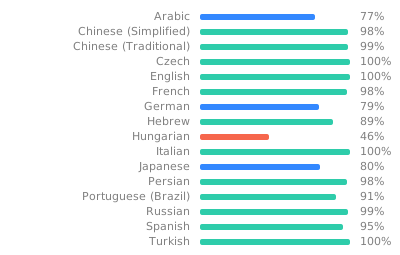
所有翻译均由我们的社区贡献者完成。
如果您想参与 Saber 的翻译,请访问 [Weblate](https://hosted.weblate.org/engage/saber-notes/)!
[](https://hosted.weblate.org/engage/saber-notes/)
## 支持 Saber
如果您喜欢 Saber,请考虑通过以下方式予以支持:
- 传播消息!
- 在 GitHub 上 Star 项目
- 在 [GitHub 赞助商](https://github.com/sponsors/adil192)上赞助我
- 通过 [PayPal](https://paypal.me/adilhanney) 捐款
- 在 Nextcloud 服务器上购买更多存储:请参阅 [定价](pricing.md)
## 开发注意事项
请阅读
[Maintainer notes](https://github.com/saber-notes/saber/wiki/Maintainer-notes)
在维基上。
[f-droid]: https://f-droid.org/packages/com.adilhanney.saber/
[flathub]: https://flathub.org/apps/details/com.adilhanney.saber
[google_play]: https://play.google.com/store/apps/details?id=com.adilhanney.saber
[snap]: https://snapcraft.io/saber
[app_store]: https://apps.apple.com/us/app/saber/id1671523739
[download_windows]: https://github.com/saber-notes/saber/releases/download/v1.32.0/SaberInstaller_v1.32.0.exe
[download_appimage]: https://github.com/saber-notes/saber/releases/download/v1.32.0/Saber-1.32.0-x86_64.AppImage
[nextcloud]: https://nc.saber.adil.hanney.org/
[privacy]: https://github.com/saber-notes/saber/blob/main/privacy_policy.md
[license]: https://github.com/saber-notes/saber/blob/main/LICENSE.md
[releases]: https://github.com/saber-notes/saber/releases
[issues]: https://github.com/saber-notes/saber/issues
[progress]: https://github.com/saber-notes/saber/discussions/1
[f-droid-manifest]: https://gitlab.com/fdroid/fdroiddata/-/blob/master/metadata/com.adilhanney.saber.yml


